
AI Jewelry Product Photography Prompts That Sell
Build refined AI jewelry product photography prompts for accurate metals, convincing gemstones, controlled reflections, elegant styling, and useful ad crops.
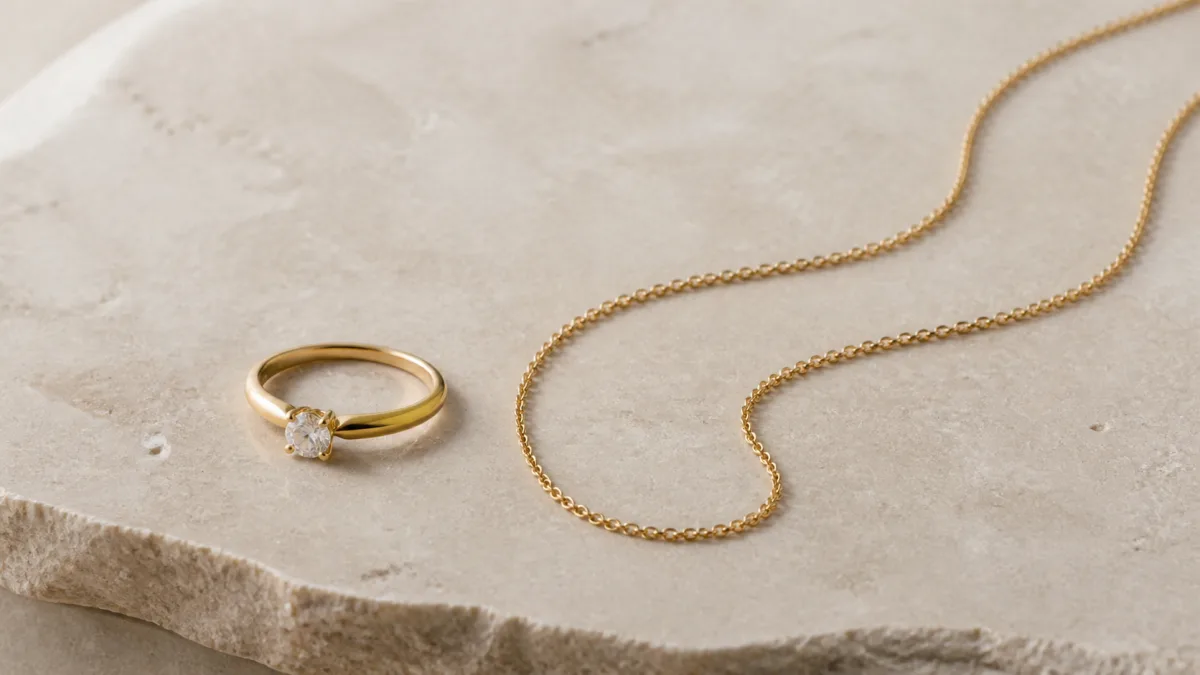
An effective AI jewelry product photography prompt protects the piece's construction before adding luxury styling. Name the jewelry type, metal color, stone cut, setting, chain or clasp, orientation, and exact number of pieces. Then direct the surface, lighting, reflections, camera distance, and crop. Jewelry is unforgiving because tiny geometry errors can change the design, while uncontrolled highlights can make precious metal look like plastic. Use AI images to develop compositions and campaign directions, but compare every candidate with the real piece before publishing. A compelling scene should clarify scale, finish, and craftsmanship without inventing stones, altering settings, or suggesting accessories that are not included.
Record the design details that cannot change
Begin with a factual inventory. “Gold necklace” leaves too much open to interpretation; “one fine yellow-gold cable chain with a small oval pendant and four-prong clear stone setting” establishes useful boundaries. Include visible closures, link style, stone count, symmetry, engraving location, and whether the piece is a single item or a pair.
Keep this information together at the start of the prompt. Art-direction language should come later. If you separate physical facts across several sentences, decorative instructions may overpower the product identity.
Choose one jewelry image purpose
Different placements require different kinds of clarity. A catalog image needs a complete view and neutral scale. A detail image can focus on a setting, texture, or clasp. A campaign image can use sculptural props and deeper shadows, but the piece should remain the visual anchor.
Plan the set before generating:
- Primary listing image with the complete piece visible.
- Macro detail that shows finish and construction.
- Scale-oriented view using a neutral reference or approved model context.
- Editorial campaign crop with room for copy.
- Gift or seasonal scene in which props remain secondary.
The showcase gallery can help you compare framing ideas. Judge whether the subject stays recognizable at thumbnail size, not just whether the scene feels expensive.
Copy a precise studio prompt
This reusable structure is suitable for a clean product concept. Replace every bracketed detail with the actual design specification.
High-end studio product photograph of [one/pair] [jewelry type], made from
[metal and finish], featuring [stone count, type, cut, color, and setting],
with [chain, clasp, engraving, or construction details]. Arranged [orientation]
on [neutral surface], photographed from [angle] with a macro product lens.
Large diffused key light from upper left, soft fill, narrow edge highlights,
controlled metal reflections, crisp gemstone facets, realistic contact shadow,
[background color], [aspect ratio], negative space on [side]. No extra stones,
no duplicated pieces, no altered setting, no warped chain, no plastic texture,
no invented text or accessories.
For a pair of earrings, specify “exactly two” and describe whether they mirror each other. For a necklace, state how the chain curves and whether the clasp should be visible.
Light metal without making it look artificial
Polished jewelry reveals its environment through reflections. Ask for broad diffused panels that create smooth highlight bands, plus narrow edge lights that define the silhouette. Avoid a vague request for “maximum shine,” which can produce clipped white patches or chrome-like surfaces.
Different finishes need different direction. Brushed metal should show a fine, consistent grain. Hammered surfaces need controlled micro-contrast. High-polish gold benefits from warm but neutral reflections, while silver should not become blue unless the campaign deliberately uses a cool environment. Keep the background palette separate from the stated metal color.
Use the product-photography prompt framework to carry these protected material details into catalog, lifestyle, and campaign variants without rewriting the product itself.
Describe gemstones with restraint
Specify cut, shape, color, setting, and light behavior. “Oval transparent pale-blue stone with visible facets in a four-prong setting” is more useful than “magical sparkling gem.” Request crisp facet definition, restrained fire, and realistic internal reflections.
Excessive sparkle can obscure the setting and misrepresent the stone. Starbursts may work for a stylized advertisement, but they should not replace a clear product view. When the exact gemstone characteristics matter to a purchase, use verified photography as the factual record and treat generated imagery as supplementary creative material.
Style an editorial scene around the piece
Choose props that contrast with the jewelry without competing. Dark slate can outline yellow metal; soft ivory paper can support silver; translucent acrylic can create modern layers. Limit the prop list and state their relationship to the piece, such as “one curved stone form behind the ring, softly out of focus.”
For campaign crops, name the reserved copy area and keep it visually quiet. You can explore variations with the AI image generator, but retain the same piece description, camera angle, and light direction when comparing backgrounds. That makes the decision about art direction clearer.
For marketplaces and comparison grids, adapt the white-background catalog setup while retaining the same stone count, setting, and metal finish.
Diagnose failures and correct the prompt
Extra stones or prongs mean the construction description needs to move earlier and become count-specific. A broken chain needs a simpler curve, more separation between overlapping links, and a wider camera view. Plastic-looking gold needs controlled panel reflections, accurate warm metal tone, and less global gloss.
If a ring becomes asymmetrical, request a straight-on or three-quarter product angle and remove elaborate props until the band is stable. If a clear stone turns opaque, describe transparent facets and subtle internal reflections rather than intense glow. Correct one physical problem before adding more mood instructions.
Maintain honest product representation
Compare the final candidate with the actual piece from multiple angles. Look for changed stone counts, thicker bands, different clasps, modified engravings, or an incorrect pair arrangement. Avoid model images that imply an inaccurate size or fit.
Exact logos, hallmarks, and legal marks should come from approved production artwork rather than generated lettering. Disclose or label imagery where required by your business, market, or publishing context, and never use a generated scene to imply a certification, material, or gem quality you cannot substantiate.
Complete the jewelry pre-publish check
Before export, confirm:
- Piece count, setting, stone count, clasp, links, and proportions match.
- Metal color and finish remain consistent across the image set.
- Highlights describe curvature without hiding important detail.
- Gemstones have believable facets without exaggerated effects.
- Chains, posts, prongs, and edges are continuous and physically plausible.
- Props do not look included with the purchase.
- Crop leaves purposeful space for any separate copy layer.
- Thumbnail size still communicates the jewelry type and silhouette.
Start with one accurate product specification, paste the studio template into Create Image, and refine lighting only after the jewelry construction is right. Precision creates the foundation; styling should support it.
Related guides
Browse all ai product photography guidesAI Product Lifestyle Photo Prompts for Believable Scenes
Build lifestyle product prompts around a real customer moment, accurate scale, product-lock details, coherent light, restrained props, and review.
How to Turn a Phone Product Photo into a Studio Image
Prepare a stronger phone reference, write a bounded studio-image prompt, protect product details, and review lighting, edges, labels, and shadows.
A Practical Seedream Product Photography Prompt Guide
Structure Seedream product photography prompts around product facts, scene choices, light, composition, constraints, and a careful review process.
Last updated .