
How to Write AI Prompts for Clear Etsy Listing Photos
Create Etsy listing photo prompts that protect handmade product details while improving backgrounds, lighting, crop, scale, and visual consistency.
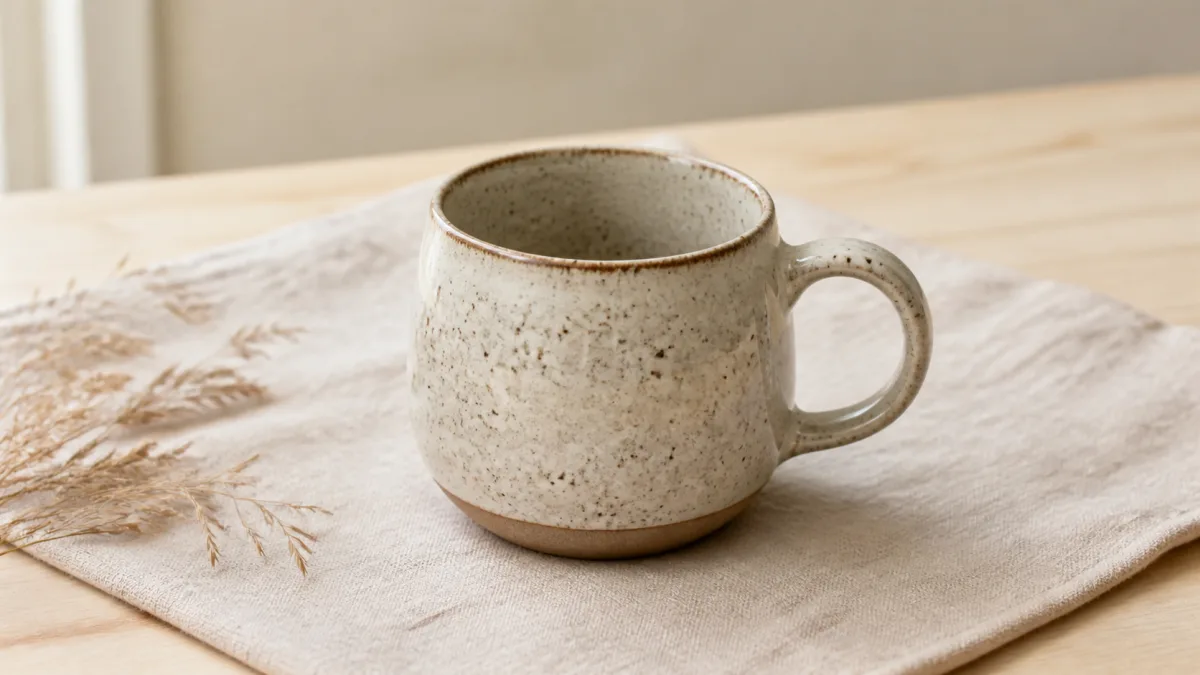
An effective AI image prompt for Etsy listing photos starts with product truth. A handmade item should retain its real shape, color, texture, dimensions, construction details, and any visible personalization. AI can help a seller explore cleaner backgrounds, lifestyle contexts, seasonal scenes, and consistent crops, but it should not turn a source photograph into a different product. Use a sharp photo as the reference, state what cannot change, and write one visual objective per prompt. Before publishing, compare every generated detail with the physical item and check the marketplace's current guidance for your category and location rather than relying on assumptions.
Decide what the listing image needs to prove
Different images answer different buyer questions. Plan a small sequence instead of asking one picture to do everything.
- Clear hero: What exactly is the product?
- Detail view: How is it made and finished?
- Scale view: How large is it in a believable context?
- Lifestyle view: Where might someone use it?
- Variation view: Which colors or options are genuinely available?
- Packaging view: What arrives, if packaging is part of the offer?
AI is most useful when it has one of these jobs at a time. Look at different composition approaches in Showcases, but keep your own product facts primary.
Prepare a reference photo that gives AI less to invent
Photograph the item in even light with clean edges and enough resolution to show material and construction. Avoid covering important surfaces with hands or props. If possible, use a three-quarter view that reveals depth as well as the front face.
Write a short reference inventory: material, exact color, finish, dimensions, hardware, seams, pattern placement, engraving, and intentional handmade variation. This list becomes the preservation block at the start of the prompt.
Separate product facts from scene choices
Product facts are fixed. Scene choices can change. Put them in separate sentences so the instruction is easy to audit.
For example, "Preserve the cup's speckled cream glaze, uneven hand-thrown rim, blue handle, and stamped maker's mark" is the fixed block. "Place it on pale oak beside a folded oatmeal linen" is the creative block. When those two ideas are mixed into an adjective-heavy paragraph, the model has more room to reinterpret the item.
Create useful scale without misleading the buyer
Scale scenes can help when an item is unfamiliar, but generated hands, furniture, or common objects may introduce false proportions. Use real dimensions in the creative brief and choose a familiar context only when you can review it carefully.
For jewelry, a real on-body photo may be safer than an invented hand. For wall art, a staged room can be useful as inspiration, but the final image should not imply a size that differs from the offered dimensions. Label supporting graphics clearly in the listing workflow when needed.
Match backgrounds to handmade materials
Backgrounds work best when they reinforce rather than compete. Linen and pale wood suit many ceramics and textiles. Matte paper can support stationery. Dark stone may help bright metal or glass stand out. A simple color field can keep complex patterns readable.
Avoid trendy scenes that conflict with the product's actual audience or erase its handmade character. The goal is clarity with personality, not the visual anonymity of a generic catalog.
Copy-ready handmade listing prompt
Use the uploaded photograph as the exact reference for this handmade [product]. Preserve its true shape, dimensions, color, material, texture, construction, pattern placement, hardware, engraving, logo, and intentional handmade irregularities. Create a [hero / detail / scale / lifestyle] listing image in [aspect ratio] from [camera angle]. Place the unchanged product on [surface] against [background], using soft [light type] from [direction] and a believable contact shadow. Add only [one restrained prop] if it helps explain use or scale. Keep the full product visible with clean margins. Do not smooth handmade texture, alter color, straighten intentional irregularities, invent text or personalization, change quantity, add accessories, hide defects, distort proportions, or add a watermark.You can refine this language in the AI image generator and move a final version into the creation workspace.
Why listing-photo generations go wrong
If a handmade object becomes too perfect, the prompt probably emphasizes polish without protecting irregularities. Name the relevant texture and ask to retain it. If colors shift, use a neutral lighting description, remove mood-heavy color grading, and compare against a color-managed source photo. If engraved text changes, use a closer reference and a simpler camera view; reject any image where the inscription is inaccurate.
Busy lifestyle images often hide the item or create accessories that look included. Reduce the scene to one surface and one context prop. The product should remain the largest, sharpest, and least ambiguous object.
Build a consistent listing gallery
Keep light direction, white balance, crop margin, and background family consistent across related products. Change the scene only when it answers a new buyer question. A coherent gallery can still contain variety: clean hero, macro detail, authentic scale photo, and restrained lifestyle image.
Do not generate fake variations to fill space. Each displayed color, count, or personalization should correspond to a real option the seller can deliver.
Pre-publish listing checklist
- Product shape, dimensions, quantity, color, material, and finish are accurate.
- Patterns, seams, hardware, labels, and personalization match the source.
- Handmade irregularities have not been erased or exaggerated.
- Props do not look included unless they actually are.
- Scale is believable and consistent with stated dimensions.
- No invented certification, review, discount, packaging, or brand mark appears.
- The image remains clear at listing-card size and at full resolution.
- Current marketplace guidance and applicable disclosure needs have been reviewed separately.
Start with one honest source photo and choose the buyer question your next image should answer. Adapt the prompt above, open Create, and reject any result that makes the scene prettier by making the product less true.
Related guides
Browse all ai product photography guidesAI Product Lifestyle Photo Prompts for Believable Scenes
Build lifestyle product prompts around a real customer moment, accurate scale, product-lock details, coherent light, restrained props, and review.
How to Turn a Phone Product Photo into a Studio Image
Prepare a stronger phone reference, write a bounded studio-image prompt, protect product details, and review lighting, edges, labels, and shadows.
A Practical Seedream Product Photography Prompt Guide
Structure Seedream product photography prompts around product facts, scene choices, light, composition, constraints, and a careful review process.
Last updated .