
AI Clothing Flat Lay Photography Prompts That Preserve Fit
Write clothing flat lay prompts that protect garment shape, fabric, color, seams, prints, and proportions while improving light and styling.
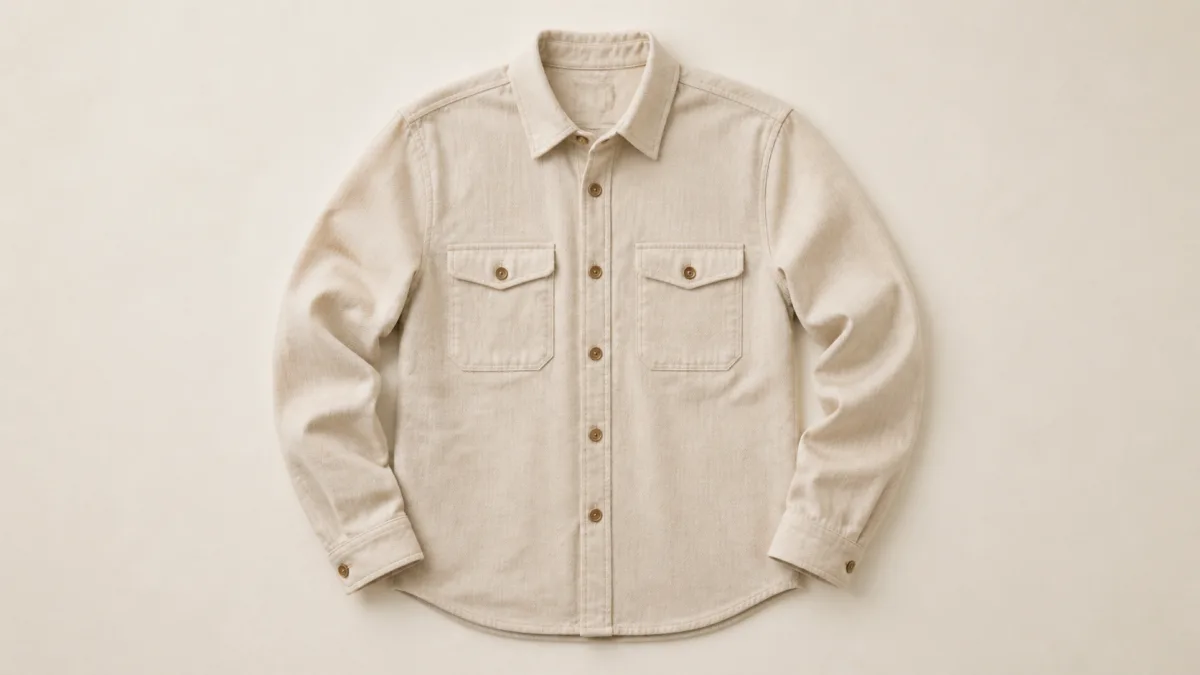
AI clothing flat lay photography prompts should protect the garment before they style the scene. Start with a clean reference photo and identify the silhouette, true color, fabric, construction, print placement, closures, and intentional folds that buyers need to see. Then choose a flat-lay purpose: a neutral catalog image, coordinated outfit, detail-led editorial, or social crop. Give the model an overhead camera, simple surface, controlled light, and explicit limits on added garments and accessories. AI can help explore art direction, but it cannot replace checking the final image against the physical garment, especially around hems, seams, sizing cues, and printed text.
Choose the right kind of flat lay
A flat lay is not one universal arrangement. Define its job before deciding how the garment should be folded or spread.
- Full-shape catalog lay: entire silhouette visible, sleeves and hem readable.
- Folded retail stack: compact presentation for a collection or color story.
- Outfit composition: garment paired with a small number of real accessories.
- Fabric detail: closer crop showing weave, stitching, print, or finish.
- Campaign layout: more negative space and a stronger art direction.
Browse Showcases for framing ideas, then select one result type rather than combining all five.
Write a garment identity block
Record the details that cannot change: garment type, cut, neckline, sleeve length, hem, panel construction, pockets, buttons or zipper, fabric composition, color, print scale, logo placement, and visible stitching. If the item is asymmetric, oversized, cropped, washed, or intentionally distressed, state that explicitly.
Put this identity block before surface and prop instructions. If the prompt begins with "coastal summer outfit," the generator may prioritize a mood and quietly replace the garment.
Arrange the silhouette for the buyer's question
For a catalog image, keep the garment open enough to show its shape. Light smoothing can make it readable, but removing all folds can make fabric look rigid. Specify natural, minimal folds at joints and edges, with the full outline visible.
For a styled outfit, define which item is the product and which pieces are supporting props. Do not allow extra belts, pockets, buttons, or jewelry to merge with the garment. A smaller prop count usually produces a cleaner, more believable result.
Describe fabric behavior instead of saying realistic
Cotton, linen, satin, denim, wool, and technical knit respond differently to light and gravity. Name the weave, weight, sheen, and expected fold behavior. Linen can show gentle slubs and relaxed creases. Satin needs controlled highlights without looking wet. Denim should retain seam thickness and structured folds. Knitwear needs visible ribbing or loops without melted edges.
Concrete material language gives the AI image generator a better brief than strings of quality adjectives.
Control color and print fidelity
Use neutral light when exact product color matters. Mood lighting can shift cream to yellow, black to blue, or red to orange. Ask for a neutral white balance, and review the result on a reliable display alongside the physical item or an approved product reference.
Prints need special care. State the repeat scale, orientation, location, and what must remain unchanged. Text, logos, and fine motifs can deform; any inaccurate version should be treated as a concept rather than a listing image.
Copy-ready apparel flat lay prompt
Use the uploaded garment photo as the exact product reference. Preserve the [garment type], true [color], [fabric and weight], silhouette, neckline, sleeve length, hem, seams, pockets, closures, logo, print placement, print scale, stitching, and intentional distressing. Arrange the unchanged garment as a [full-shape / folded / outfit] flat lay on [surface], photographed from a true overhead camera in [aspect ratio]. Keep the complete outline visible with natural fabric folds and consistent proportions. Use broad soft light from [direction], neutral white balance, gentle texture-revealing shadows, and clean margins. Add only [specific real accessories] as separate supporting objects. Do not change the cut, add buttons or pockets, invent text, stretch the print, recolor the fabric, duplicate the garment, merge props into it, remove characteristic texture, or add a watermark.Paste an adapted version into the Create workspace after replacing every bracket with a specific decision.
Common flat-lay failures and fixes
If sleeves are different lengths, ask for a symmetrical overhead arrangement only if the real garment is symmetrical, and keep the full outline inside the frame. If fabric looks like plastic, remove generic "glossy" or "ultra-smooth" terms and describe the actual weave and low-level sheen. If buttons multiply, specify their exact count and placement near the start of the prompt.
When prints warp, simplify the fold pattern and camera angle. A complex twisted arrangement may be suitable for a mood image but not for accurate merchandising. If color drifts, return to neutral light and remove colored surfaces that cast a tint.
Maintain consistency across a collection
Create a small style specification: camera height, background, light direction, crop margin, garment scale, and shadow softness. Reuse it across shirts, trousers, or color variants while changing the factual identity block for each item.
Consistency does not mean copying one image. Long garments may need a portrait frame, while folded accessories may work in a square. Keep the visual system stable but let the product determine the crop.
Pre-publish flat lay checklist
- Silhouette, neckline, sleeves, hem, seams, pockets, and closures match the item.
- Fabric texture, weight, sheen, and fold behavior look plausible.
- Color is checked against an approved reference under neutral viewing.
- Print, logo, lettering, and pattern repeat remain accurate.
- No prop appears attached to or included with the garment by accident.
- The full product or intended detail remains visible at final crop size.
- Shadows anchor the garment without hiding construction.
- The image has been inspected at full resolution for duplicated edges and melted stitching.
Select one garment, document its fixed details, and adapt the prompt for a single placement. Open Create to make the first composition, then compare every seam and edge with the source before producing a full collection.
Related guides
Browse all ai product photography guidesAI Product Lifestyle Photo Prompts for Believable Scenes
Build lifestyle product prompts around a real customer moment, accurate scale, product-lock details, coherent light, restrained props, and review.
How to Turn a Phone Product Photo into a Studio Image
Prepare a stronger phone reference, write a bounded studio-image prompt, protect product details, and review lighting, edges, labels, and shadows.
A Practical Seedream Product Photography Prompt Guide
Structure Seedream product photography prompts around product facts, scene choices, light, composition, constraints, and a careful review process.
Last updated .