
How to Replace a Sky With AI and Keep the Foreground Intact
Replace a dull or distracting sky while preserving the subject, skyline, foreground exposure, reflections, perspective, and believable light direction.
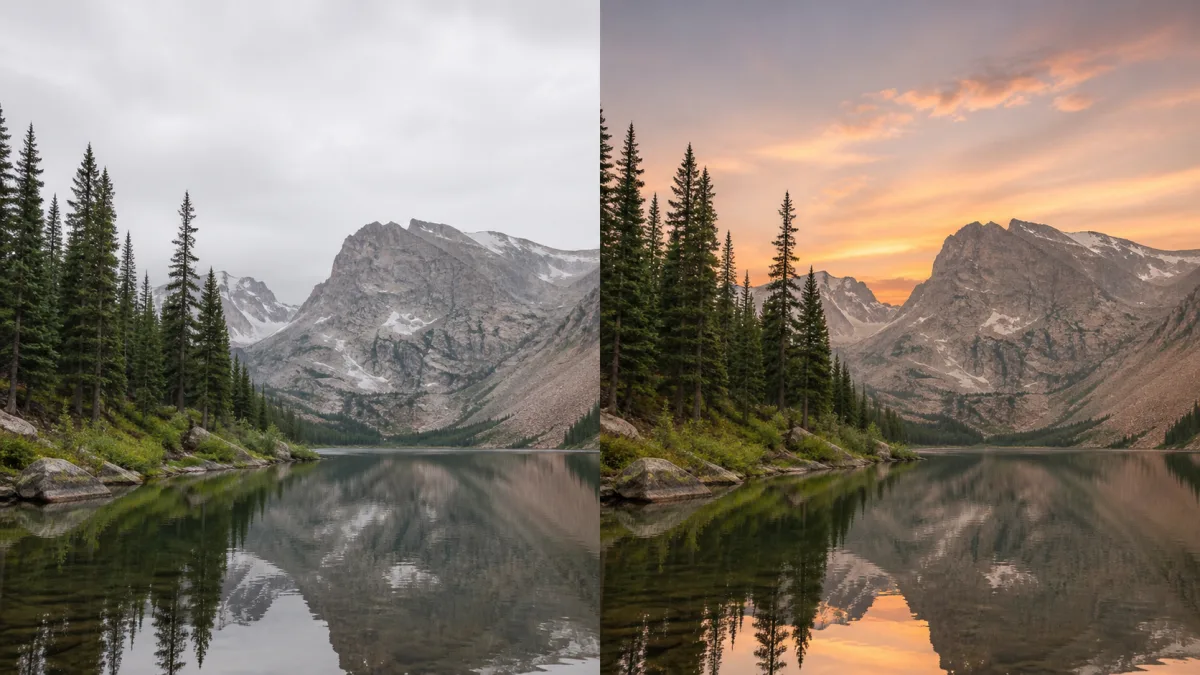
To replace sky with AI and keep foreground details intact, protect everything below the skyline and describe the new sky as a lighting condition, not just a dramatic visual. Preserve the subject, buildings, trees, horizon, crop, camera angle, foreground exposure, and existing perspective. Choose a sky whose sun direction, color temperature, cloud scale, and weather can plausibly match the original scene. If a local mask or sky selection is available, include a narrow transition around branches and rooftops without opening the full foreground to editing. Then inspect reflections, rim light, shadows, and edge halos, because a beautiful sky can still make the photograph physically inconsistent.
Read the existing scene before choosing a sky
The foreground already contains evidence about the sky that was present when the image was captured. Look at shadow direction, highlight softness, color cast, haze, wet surfaces, and the brightness around the horizon. A cloudy landscape has broad, low-contrast light. A direct sunset creates long shadows and warm highlights. Replacing one with the other may require more than changing the pixels above the horizon.
Choose the closest plausible weather and time of day when preservation is the priority. A subtle textured overcast or late-afternoon sky often requires fewer foreground changes than an intense storm or vivid sunset.
Define the protected foreground precisely
“Keep the foreground” can be too vague when the scene contains distant mountains, fine branches, glass, water, or a person extending into the sky. Name the protected regions and edge details.
Preserve:
- People, products, vehicles, and buildings
- Tree trunks, branches, leaves, antennas, and rooflines
- Mountains, horizon, and atmospheric depth
- Ground, water, crop, and camera perspective
- Existing reflections unless a change is specifically required
- Fine edge contrast and natural depth of field
Decide whether distant haze belongs to the foreground or the transition into the new sky. Usually it should remain as a soft bridge rather than being cut away.
Describe a sky that belongs to the camera view
Clouds have perspective and scale. A wide-angle city image may show cloud lines converging toward the horizon, while a telephoto landscape compresses distant forms. State the desired cloud type, coverage, brightness, horizon condition, and light direction. Avoid asking for several unrelated weather effects at once.
Preserve the complete foreground exactly as photographed, including the person,
trees, rooflines, distant hills, crop, camera angle, and ground shadows. Replace
only the sky with soft broken clouds after light rain, pale blue-gray near the
horizon and slightly deeper overhead. Keep the existing gentle light from camera
left, realistic atmospheric haze, and natural cloud perspective. Do not alter,
relight, move, or restyle any foreground element.
For a clean commercial scene, a simple sky with controlled contrast is often more useful than a spectacular one that competes with the subject.
Handle skylines and fine edges carefully
If selection tools are available, avoid a hard boundary directly on tree leaves or hair. Include a small transition area so fine gaps can reveal the replacement naturally. Around buildings and mountains, keep the boundary closer to protect architecture and terrain. Zoom in before generating to identify transparent glass, wires, railings, and motion-blurred edges.
A sky replacement behind bare branches may need a separate local cleanup pass. Do not respond to one imperfect twig by regenerating the whole image. Protect the successful regions and correct only the edge if the editor allows it.
Decide what to do with light and reflections
An AI sky replacement keep subject workflow should not automatically relight the whole foreground. If the new sky closely matches the original conditions, preserving existing light is appropriate. If you introduce a visible low sun, however, the absence of corresponding highlights and shadows may look wrong.
Use the least invasive solution. Reduce the drama of the sky before asking for global relighting. On water, glass, or polished metal, check whether the new sky should appear as a subtle reflection. A reflection need not be a perfect mirror, but its color and brightness should not contradict the sky above it.
Why sky replacements look pasted on
The main causes are a hard edge, mismatched color temperature, impossible sun direction, incorrect cloud perspective, or excessive saturation. Another common failure is foreground drift: trees, buildings, or faces change because the edit region was too broad or the prompt requested a complete cinematic transformation.
Fix the result by choosing a more compatible sky, narrowing the editable region, and removing global style terms. Preserve haze at the horizon, soften an overly sharp sky, and lower contrast until foreground and background share the same visual atmosphere. If the foreground changed, return to the original source rather than editing a compromised version.
Review physical consistency at full resolution
Inspect rooflines, leaves, wires, hair, and mountains for halos or remnants of the old sky. Check that cloud sharpness agrees with lens focus and that noise or grain does not suddenly change above the horizon. Look for duplicated birds, moons, suns, or cloud shapes that create unintended focal points.
Then judge the whole frame. The brightest region should support the subject, not pull attention to an arbitrary corner. Compare the color of white objects in the foreground with the sky’s temperature. A cool sky above strongly warm neutral objects often reveals the edit.
Sky-replacement checklist
Before exporting, confirm:
- The subject and foreground geometry remain unchanged.
- Fine skyline edges are clean without halos.
- Cloud scale and perspective match the lens and horizon.
- Sun direction agrees with visible shadows and highlights.
- Haze creates a natural transition near the horizon.
- Water and glass reflections remain believable.
- Color, sharpness, and grain feel continuous.
- The sky supports rather than overwhelms the composition.
Build a restrained new atmosphere
Explore lighting and landscape references in the AI image showcases, then use the AI image generator to write a preserve-first sky instruction. Open the Create workspace with your original photo and make one atmosphere change that the foreground can physically support. The goal is not the most dramatic sky; it is a finished image whose new sky feels as though it was always above the scene.
Related guides
Browse all ai reference editing guidesAn AI Inpainting Mask Guide for Clean Local Edits
Plan cleaner local AI edits by choosing mask boundaries, context margins, feathering, protected regions, staged passes, and full-resolution checks.
How to Write Better Negative Prompts for Realistic AI Images
Build concise negative prompts from visible risks while keeping positive direction clear, specific, compatible, and useful for realistic image creation.
How to Fix Unrealistic Reflections in AI Images
Correct mirrors, glass, water, metal, and glossy surfaces by tracing reflected geometry, viewpoint, light, roughness, occlusion, and material behavior.
Last updated .