
How to Fix Unrealistic Reflections in AI Images
Correct mirrors, glass, water, metal, and glossy surfaces by tracing reflected geometry, viewpoint, light, roughness, occlusion, and material behavior.
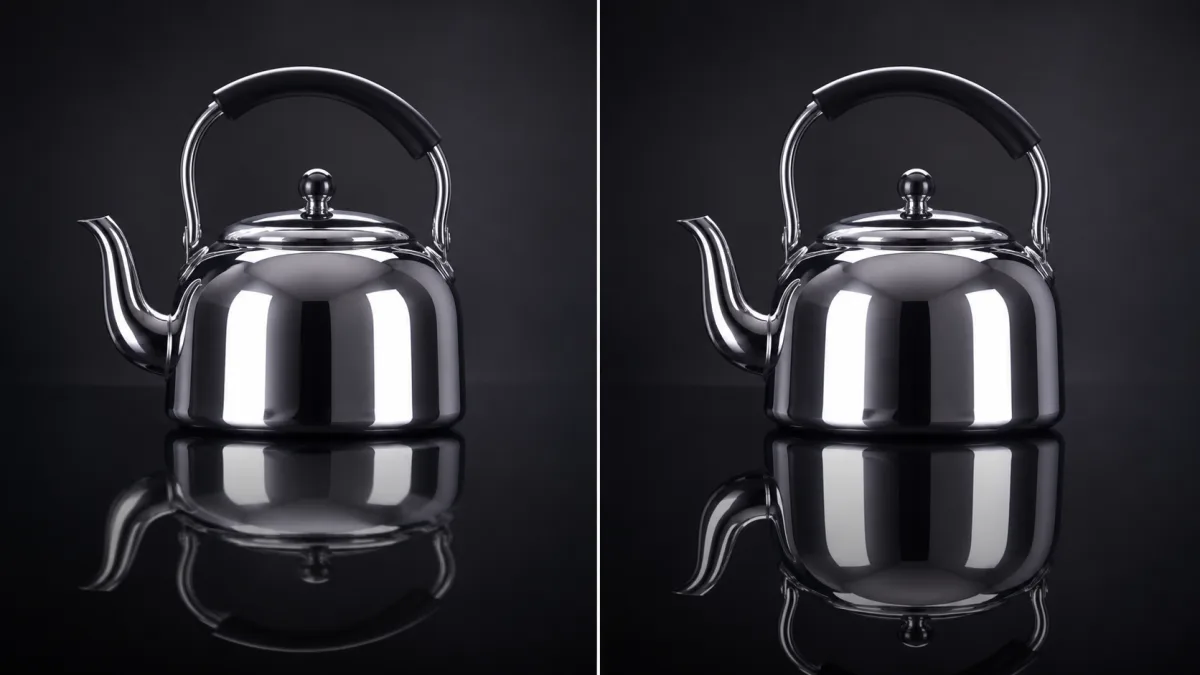
To fix unrealistic reflections in AI images, identify the material first and reconstruct only the reflected region according to viewpoint, surface orientation, roughness, and nearby light. A mirror, window, calm water, brushed metal, and glossy table should not reflect the scene in the same way. Preserve the main subject, camera angle, surface geometry, crop, and lighting. State which object should appear in the reflection, where it should begin, how sharp or distorted it should be, and which elements should be occluded. If local editing is available, isolate the reflection plus a small material context area. Check reflected text, faces, object count, shadow direction, and perspective at full size.
Identify the reflective material
Start by naming what the surface is made of and how smooth it is. A clean mirror returns a relatively sharp image. Rough metal produces broad, distorted highlights rather than a readable duplicate. Glass can show both transmission and reflection. Water breaks the image through ripples and viewing angle.
Document:
- Surface type and orientation
- Smoothness or roughness
- Transparency, if any
- Curvature or ripples
- Distance between object and surface
- Dominant light sources
- What lies behind or beneath the material
This prevents a generic “realistic reflection” request from turning every material into a mirror.
Trace what should actually be reflected
List the visible subject, lights, windows, and environment that face the surface. Consider occlusion: a product can block part of its own reflection, and a person may not be visible in glass that faces away from them. Curved objects reflect a wider, compressed environment.
Do not demand factual content that is outside the source view. If the scene does not show what lies behind the camera, keep that reflection abstract or use another reference rather than inventing a detailed room.
Write a material-specific correction prompt
Protect the scene and describe only the reflection behavior that needs correction.
Preserve the product, label, camera angle, tabletop, lighting, crop, and all
background objects. Correct only the reflection directly beneath the bottle on
the dark glossy stone. Align it with the bottle base and camera perspective,
show a vertically compressed and slightly softened reflection of the same
silhouette, preserve the exact object count, and fade the reflection gradually
with distance. Keep the stone subtly rough. Do not mirror the label text,
duplicate the bottle, or change the product itself.
If exact text appears in a mirror, inspect it separately. Important brand copy may be better handled in a controlled finishing step.
Align reflection geometry with the camera
Reflections depend on viewing angle. On a horizontal surface, the reflected image begins at the contact point and extends away according to perspective. On a vertical mirror, its apparent viewpoint follows the relationship between camera, subject, and mirror plane.
Check anchor points: feet meeting a wet floor, a bottle base on polished stone, or a face in a bathroom mirror. A floating gap or incorrect connection reveals the error immediately. Preserve the surface plane when editing so the reflection does not rotate independently.
Match sharpness, brightness, and falloff
A reflection is rarely an equally bright duplicate. Material roughness softens detail, tinted glass changes color, and distance or ripples reduce clarity. Ask for plausible falloff and keep reflected contrast lower when the surface requires it.
Review whether the reflection should include the brightest light source. A product may show a softbox highlight without displaying a complete studio. Avoid unexplained white streaks that do not follow curvature or surface direction.
Handle mirrors, glass, water, and metal differently
Mirrors require strong geometric consistency, especially for faces, hands, clothing, and room layout. Glass needs a balance of transparency and reflection. Water combines reflection with depth, color, and wave distortion. Polished metal reflects the environment through curvature and roughness rather than a flat duplicate.
Correct one material at a time. A scene with windows, chrome, and water may need separate local instructions because each surface has different behavior.
Why reflection fixes create duplicate subjects
The model may interpret “add a reflection” as “add another object,” particularly when the surface boundary is unclear. It may also copy a face or product with different proportions, alter label text, or place a second object behind glass. Broad relighting requests can change both the reflection and the source subject.
Define the reflecting plane, anchor point, compression, softness, and fade. State “exact object count remains unchanged.” If local selection exists, restrict the edit to the surface and protect the subject. When the duplicated form persists, simplify the reflection rather than making it sharper and more literal.
Reflection-correction checklist
Before accepting the image, confirm:
- The material behaves according to its roughness and transparency.
- The reflected object is the correct subject and count.
- Anchor points and perspective align with the surface.
- Curvature or ripples distort the image plausibly.
- Brightness, sharpness, and falloff are restrained.
- Faces, hands, labels, and text remain accurate.
- Reflected lights have a visible cause.
- The original subject and camera angle remain unchanged.
Correct the surface without rebuilding the scene
Review material and product lighting in the AI image showcases, then use the AI image generator to identify the reflective plane and protected subject. Open the Create workspace with the original image and correct one material region. To correct reflections in AI generated images, make the surface obey the scene rather than asking the entire scene to reorganize around a decorative reflection.
Related guides
Browse all ai reference editing guidesAn AI Inpainting Mask Guide for Clean Local Edits
Plan cleaner local AI edits by choosing mask boundaries, context margins, feathering, protected regions, staged passes, and full-resolution checks.
How to Write Better Negative Prompts for Realistic AI Images
Build concise negative prompts from visible risks while keeping positive direction clear, specific, compatible, and useful for realistic image creation.
How to Preserve the Camera Angle in AI Image Edits
Protect viewpoint and perspective during AI editing by defining camera height, orientation, horizon, vanishing lines, subject scale, and lens behavior.
Last updated .