
How to Preserve a Pose When Editing a Reference Image With AI
Keep body position stable during an AI edit by protecting joint relationships, silhouette, contact points, crop, camera view, and natural balance.
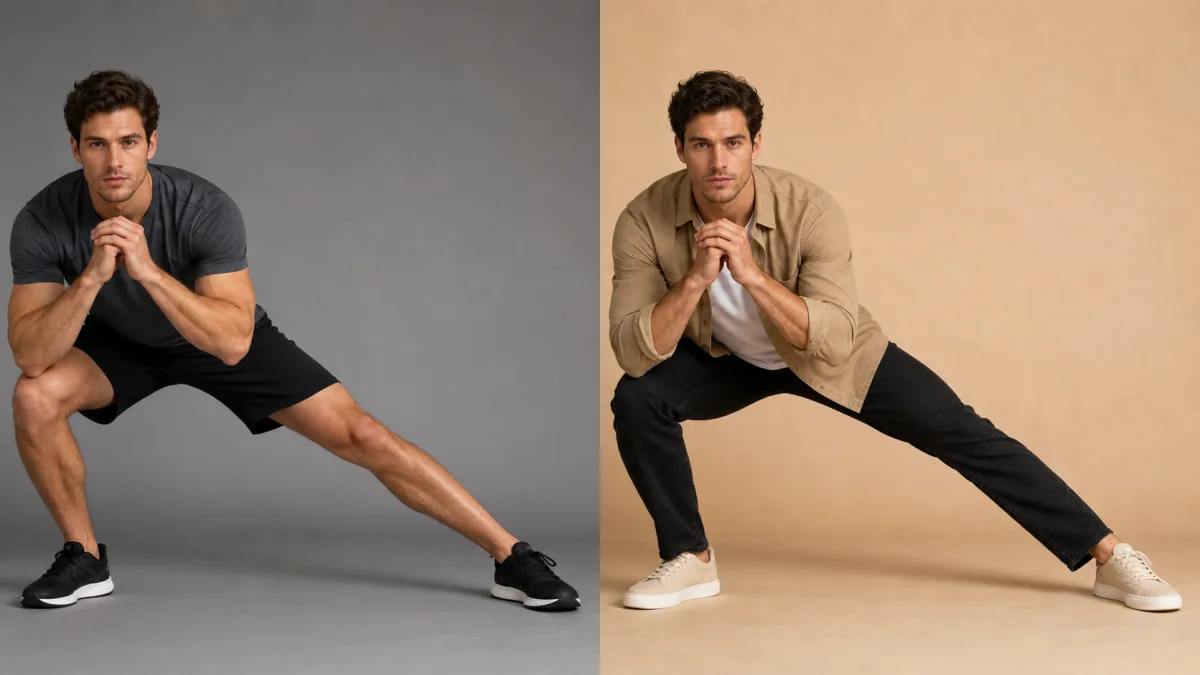
To preserve pose in AI image editing, describe the body as a set of fixed spatial relationships rather than saying only “keep the same pose.” Protect head angle, shoulder line, spine direction, hip position, arm bends, hand placement, leg stance, weight distribution, silhouette, and contact with furniture or objects. Keep the crop, camera height, and viewing angle unchanged, because a camera shift can make the same body position appear different. Limit the requested edit to clothing, background, color, or another separate region. If local selection is available, protect joints and contact points. Compare the output with the reference using silhouette and landmarks before judging style or surface detail.
Read the pose as structure
Begin by tracing the pose from top to bottom. Note where the person’s weight rests, which shoulder is higher, how the pelvis turns, and where limbs overlap. A hand on a table, foot on a stair, or back against a chair provides an important contact constraint. The model must preserve those relationships for the pose to remain physically coherent.
Record the essentials:
- Head tilt and gaze direction
- Shoulder and hip angles
- Spine curve or torso lean
- Elbow, wrist, knee, and ankle bends
- Hand and foot placement
- Weight-bearing leg or support point
- Overlap order between limbs, clothing, and objects
- Visible silhouette and negative spaces
Do not invent hidden anatomy. Describe only what the source supports.
Keep crop and camera view fixed
Pose depends on perspective. A person photographed from a low angle appears to have different limb proportions than the same person viewed at eye level. If the prompt requests a new camera position, the model must reconstruct unseen parts and may change the pose.
State that camera height, lens perspective, crop, and subject scale remain fixed. If a new output ratio is required, extend the environment rather than scaling or repositioning the body unless composition changes are intentional.
Write a landmark-based preserve prompt
Combine the global preserve instruction with a concise list of visible landmarks.
Use the uploaded image as the pose and identity reference. Preserve the exact
head tilt, left shoulder raised slightly, torso leaning forward, right elbow
bent on the table, left hand resting in the lap, crossed ankles, seated weight,
silhouette, crop, and camera angle. Change only the jacket to a dark green
cotton overshirt with realistic folds around the existing joints. Do not move,
straighten, rotate, resize, or redraw the body, hands, face, chair, or table.
Keep the list short enough to remain usable. Focus on relationships that define the pose, not every visible crease.
Protect contact points and overlaps
Hands gripping objects, feet meeting the floor, and bodies touching furniture are frequent failure points. A clothing edit may cover a wrist; a background change may redraw a chair arm; a new prop may force fingers into another position. Name these contacts and preserve the objects involved.
If local editing is available, avoid selecting the hand-object boundary unless it truly needs correction. When fabric passes behind a hand, edit around the protected hand and allow only a narrow contextual margin for the new sleeve or cuff.
Change clothing without changing posture
New clothing must fit the existing joint angles and body position. Structured garments can alter the silhouette, but they should not change bone placement or weight distribution. Describe material and fit, then ask for folds consistent with the current pose.
Avoid wardrobe requests that require a different body configuration, such as turning a seated cropped portrait into a full-length flowing gown. If the garment cannot be represented within the visible frame, choose another source rather than asking the model to invent the missing stance.
Why a preserved pose still drifts
Pose drift often comes from action verbs or style language. “Confident power pose,” “relaxed stance,” or “dynamic fashion shot” can override the reference. Large background perspective changes may also make the original stance impossible. When hands or feet are small, the model may simplify them and accidentally move the limb.
Remove action and mood instructions, restore the landmark list, and keep the environment compatible with the source camera. Bring the subject closer only by returning to a higher-resolution source, not by asking for a new crop that changes perspective. Repair a single hand or fabric boundary locally if the option exists.
Compare silhouette and joint landmarks
Overlay the images mentally or place them side by side at the same size. Check the outer silhouette first, then the center of the head, shoulders, elbows, wrists, hips, knees, ankles, hands, and feet. Confirm that negative spaces—between an arm and torso or between crossed legs—retain their shapes.
Only after structure matches should you inspect identity, fabric, lighting, and background. An attractive output with a different shoulder line or shifted hand is a new pose, not a successful preservation edit.
Pose-preservation checklist
Before accepting the image, verify:
- Head, shoulders, spine, hips, and limbs retain their relationships.
- Weight distribution and support points remain plausible.
- Hands, feet, and held objects stay in place.
- Contact with furniture and surfaces is unchanged.
- Crop, subject scale, and camera perspective match.
- New clothing follows existing joints and gravity.
- Identity and body proportions remain stable.
- No style instruction introduced a new stance or action.
Make one change around a fixed body position
Study clear figure compositions in the AI image showcases, then use the AI image generator to write a landmark-based preserve/change instruction. Open the Create workspace with the strongest reference and change one visual category around the pose. To keep body pose in reference image edits, treat joints, contact points, and camera view as protected facts rather than optional similarities.
Related guides
Browse all ai reference editing guidesAn AI Inpainting Mask Guide for Clean Local Edits
Plan cleaner local AI edits by choosing mask boundaries, context margins, feathering, protected regions, staged passes, and full-resolution checks.
How to Write Better Negative Prompts for Realistic AI Images
Build concise negative prompts from visible risks while keeping positive direction clear, specific, compatible, and useful for realistic image creation.
How to Fix Unrealistic Reflections in AI Images
Correct mirrors, glass, water, metal, and glossy surfaces by tracing reflected geometry, viewpoint, light, roughness, occlusion, and material behavior.
Last updated .