
How to Preserve the Camera Angle in AI Image Edits
Protect viewpoint and perspective during AI editing by defining camera height, orientation, horizon, vanishing lines, subject scale, and lens behavior.
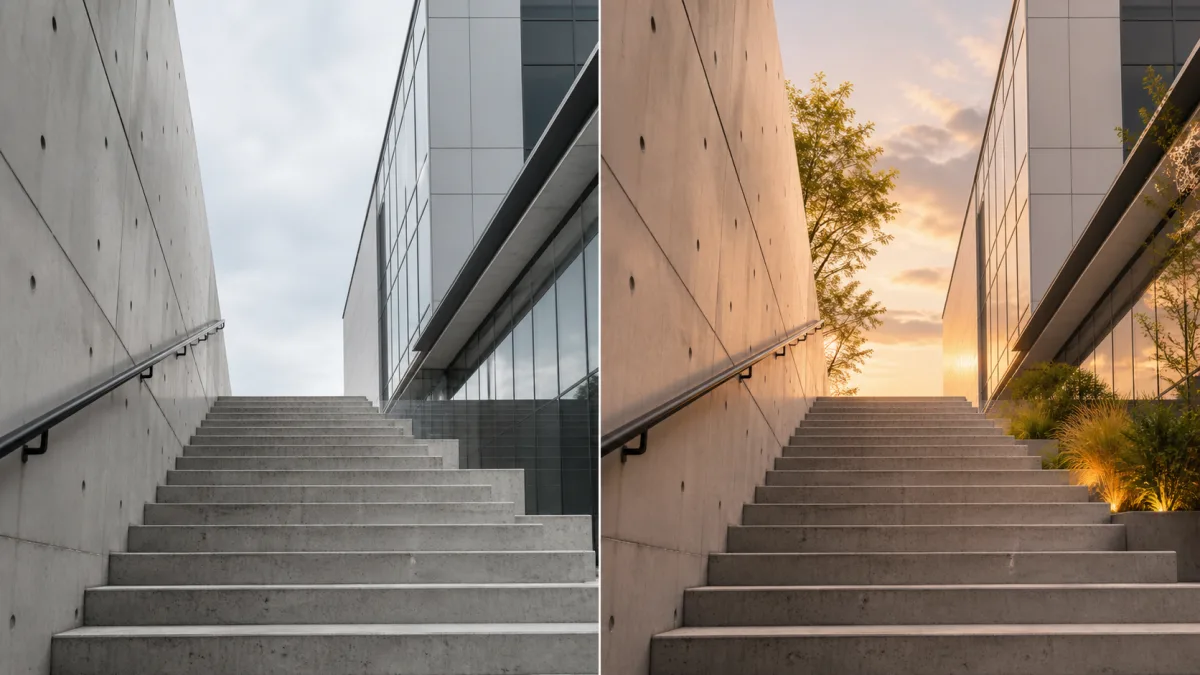
To preserve camera angle in AI image edits, protect the viewpoint as a group of observable constraints: camera height, tilt, horizontal orientation, horizon level, subject scale, viewing direction, vanishing lines, and depth compression. Do not ask for a new angle while expecting the same composition. Describe the requested change—background, material, weather, or clothing—without introducing camera language that conflicts with the source. Keep straight lines and contact surfaces aligned, and use local editing if available when only one region needs to change. Compare the source and result at matching size, paying special attention to eye level, object tops, floor planes, and the relative size of near and distant elements.
Identify the original viewpoint
Ask where the camera appears to be relative to the subject. Is it at eye level, waist height, near the floor, or above the scene? Is it looking up, down, or horizontally? Note whether vertical lines remain parallel or converge, and where the horizon crosses the frame.
Useful observations include:
- Low, eye-level, or elevated camera height
- Upward, level, or downward tilt
- Front, three-quarter, side, or rear viewing direction
- Horizon position
- Wide, normal, or compressed perspective feel
- Subject size and distance from the camera
- Main vanishing directions in roads, rooms, tables, or buildings
Avoid guessing an exact focal length unless it is known. Relative lens behavior is enough to guide preservation.
Separate viewpoint from composition
Camera angle describes where and how the scene is viewed. Composition describes where elements sit inside the frame. They are related but not identical. You can extend a canvas while preserving the viewpoint, or move a background object without changing camera height. Conversely, moving the camera changes visible surfaces even if the subject remains centered.
State both protected properties. Preserve the source camera and the subject’s scale and placement unless repositioning is part of the brief.
Use perspective landmarks in the prompt
Name the most important lines and visible planes so the model knows what must continue.
Preserve the original low camera height, slight upward view, horizon position,
three-quarter subject angle, subject scale, crop, and wide perspective. Keep the
floor seams and wall edges converging toward the same vanishing directions.
Change only the plain wall material to pale textured concrete with the existing
light and shadow. Do not raise, lower, rotate, zoom, recrop, or move the camera,
subject, floor, or architectural lines.
For a tabletop product, protect how much of the top and sides are visible. For a portrait, protect eye level and head orientation as well as background lines.
Match new objects to the existing camera
Anything added must occupy the same perspective system. A chair placed in a low-angle room should reveal compatible underside and seat surfaces. A sign on a wall should follow the wall plane. A background building should scale and converge with the street.
Keep additions simple when viewpoint matters. Every new object introduces more geometry that can conflict. Use size, overlap, and atmospheric depth to place objects rather than relying on vague terms such as “in the distance.”
Preserve subject scale during background changes
Background replacement often changes the perceived lens. A small room behind a large subject can make the person look pasted in; a vast landscape with a close studio portrait can create mismatched depth. Choose an environment compatible with the source and ask for matching camera height and depth of field.
Do not let the editor shrink the subject to reveal more setting. If more canvas is needed, extend the environment while keeping the original image anchored. Check that feet, product bases, and furniture meet the ground plane correctly.
Why perspective changes unexpectedly
Conflicting phrases such as “bird’s-eye view,” “dynamic low angle,” “wide establishing shot,” or “close-up” authorize a new camera. Asking to reveal a previously hidden side of an object also requires viewpoint invention. Broad scene regeneration can redraw floors and walls even when the subject remains similar.
Remove new camera language, restore viewpoint landmarks, and reduce the edit to one region. If a local selection is available, protect the original structural lines. When the desired result genuinely needs another viewpoint, treat it as a new generation with additional references rather than claiming the original angle has been preserved.
Compare planes, lines, and visible surfaces
Place source and result side by side. Check horizon height, amount of visible floor or tabletop, vertical convergence, subject scale, and the angles of repeated lines. Inspect which sides of a product, face, or building are visible. A changed top surface is a strong clue that camera height moved.
Then examine depth. Near objects should remain proportionally larger than distant ones in the same way as the source. Blur and atmospheric softness should support that geometry.
Camera-preservation checklist
Confirm that:
- Camera height, tilt, and viewing direction match.
- Horizon and vanishing lines remain stable.
- Subject scale, crop, and placement are unchanged.
- The same object surfaces remain visible.
- New elements follow the existing ground and wall planes.
- Depth of field and relative scale remain coherent.
- No prompt phrase requested a contradictory shot type.
- Structural lines remain continuous through edited regions.
Edit within the original viewpoint
Explore perspective choices in the AI image showcases, then use the AI image generator to identify the camera facts in your source. Open the Create workspace and request one change that can exist inside that view. To keep perspective in AI image editing, protect the geometry that tells viewers where the camera was, not merely the subject at the center of the frame.
Related guides
Browse all ai reference editing guidesAn AI Inpainting Mask Guide for Clean Local Edits
Plan cleaner local AI edits by choosing mask boundaries, context margins, feathering, protected regions, staged passes, and full-resolution checks.
How to Write Better Negative Prompts for Realistic AI Images
Build concise negative prompts from visible risks while keeping positive direction clear, specific, compatible, and useful for realistic image creation.
How to Fix Unrealistic Reflections in AI Images
Correct mirrors, glass, water, metal, and glossy surfaces by tracing reflected geometry, viewpoint, light, roughness, occlusion, and material behavior.
Last updated .