
How to Make AI Images Look Less AI-Generated
Diagnose the overall AI look in an image and improve composition, materials, lighting, detail hierarchy, imperfections, and production finishing.
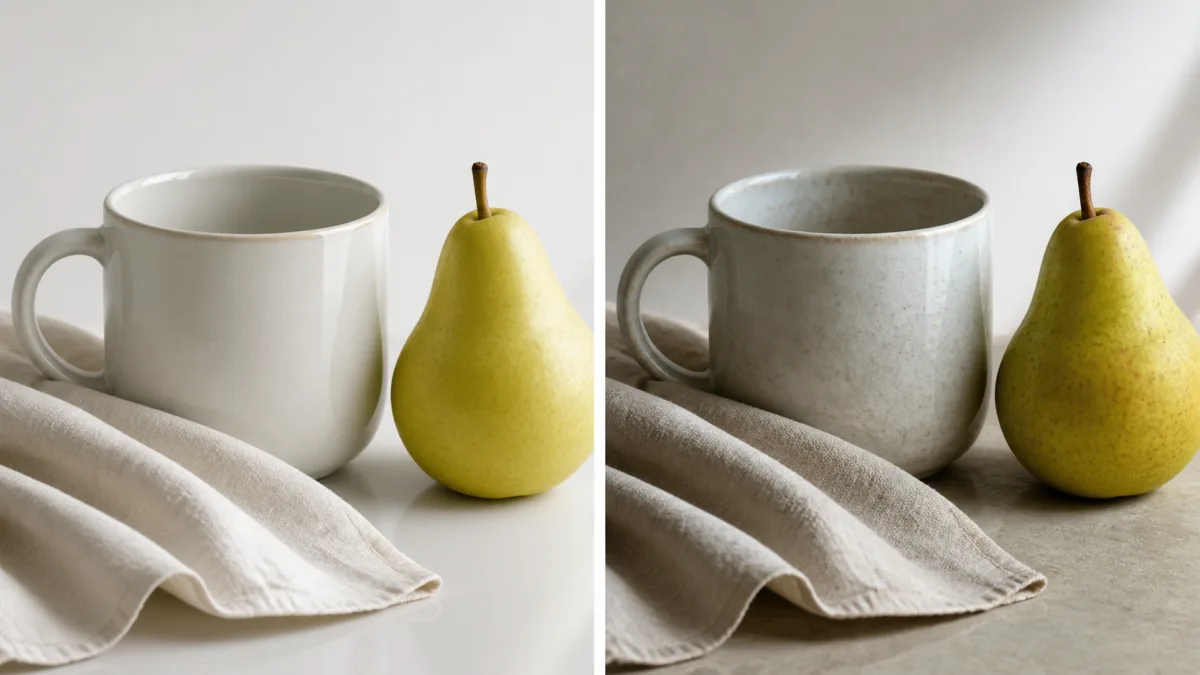
To make AI images look less AI, stop treating “realism” as one global effect and diagnose the specific signals that feel generated. Common clues include over-polished lighting, equal detail everywhere, plastic materials, crowded compositions, repeated objects, impossible reflections, perfect symmetry, and aggressive sharpness. Preserve the parts that already work, then correct one category at a time: composition, light, material response, anatomy, environment, or finishing. Use references for physical structure when appropriate, keep prompts concrete, and prefer local edits if available. The goal is not to add random noise or flaws; it is to restore believable priorities, causes, and variation so the image feels intentionally made rather than uniformly synthesized.
Identify the strongest artificial signal first
View the image at thumbnail size and note the first thing that feels wrong. Then inspect at full size to find the cause. A portrait may feel artificial because every surface has the same gloss, while an interior may fail because furniture legs do not meet the floor. A landscape may use physically plausible objects but distribute detail with no atmospheric depth.
Classify the problem before editing:
- Composition and focal hierarchy
- Lighting and shadow logic
- Materials and surface texture
- Anatomy and object construction
- Repetition and background continuity
- Color grading, sharpness, and noise
- Typography, logos, or factual details
Choose one category. A prompt asking to “make everything realistic” gives no stable way to compare results.
Preserve the successful decisions
Write down what the image gets right: subject, expression, pose, camera angle, palette, layout, or atmosphere. These are the preserve list. The change list should name one visible issue, such as flattening the excessive highlight on fabric or simplifying duplicated background objects.
This matters because a full regeneration may trade one obvious defect for several new ones. If the composition and lighting already support the image’s purpose, protect them while refining a small surface or region. When local editing is available, include enough neighboring context to match edges and light without exposing the whole frame.
Replace quality adjectives with physical descriptions
Words such as “ultra-realistic,” “masterpiece,” “8K,” and “highly detailed” can push every region toward the same polished intensity. Describe how the scene was photographed or constructed instead: source direction, softness, lens height, material, wear, depth of field, and environmental conditions.
Preserve the subject, pose, camera angle, framing, and overall color palette.
Reduce the synthetic polished look by using one soft window light from camera
left, natural falloff into shadow, restrained contrast, realistic material
response, and varied detail by depth. Keep skin, fabric, wood, and metal
distinct. Remove duplicated background objects and excessive edge sharpening.
Do not redesign the composition or add decorative elements.
This prompt defines causes rather than asking the model to imitate a generic idea of photography.
Restore a believable hierarchy of detail
Real photographs do not show every surface with equal clarity. Focus falls on a plane, textures soften with distance, and shadow areas reveal less information. AI images often sharpen hair, pores, fabric, foliage, and distant architecture equally, creating a dense synthetic feel.
Choose the focal subject and allow secondary areas to become simpler. Keep the eyes or product label readable while reducing micro-detail in the background. Do not blur everything uniformly. Depth should follow distance and lens behavior, not a software-like overlay around the subject.
Make materials behave differently
Plastic skin, rubbery fabric, metallic wood, and glass without meaningful refraction all come from weak material separation. Name the relevant physical qualities. Matte ceramic has broad soft highlights; brushed metal has directional reflection; cotton absorbs light and forms fine folds; glass shows both transmission and reflection.
Edit the failed material without changing every surface. Compare highlight shape, roughness, edge behavior, and contact shadow. Small imperfections should follow how the object is made and used. Random scratches on a clean portrait do not create realism.
Correct light before applying a grade
A cinematic color grade cannot repair impossible illumination. Identify the dominant source, its direction, size, color, and relationship to shadows. Remove unexplained rim lights or bright patches. Ensure cast shadows begin at contact points and become softer with distance when appropriate.
After the light is coherent, apply restrained finishing. Avoid crushing blacks, clipping highlights, or pushing teal-orange separation across every object. A credible neutral baseline usually makes later style choices more convincing.
Why “make it realistic” often makes the image worse
The instruction is too broad. The model may change the face, add pores everywhere, darken the scene, or introduce camera artifacts while leaving the original structural problem untouched. Adding film grain, blur, or chromatic aberration too early can hide symptoms without fixing object geometry or light.
Return to the source and name the highest-impact defect. Preserve everything else. If hands are wrong, repair hands; if reflections are wrong, correct reflective relationships; if the background repeats, simplify the repeated region. Production finishing should come after structural corrections.
Use a final realism checklist
Review the image in this order:
- Is there one clear focal subject?
- Do anatomy and object construction make sense?
- Does each material respond to light appropriately?
- Do shadows and reflections have identifiable causes?
- Does detail decrease naturally with depth?
- Are repeated objects and textures varied plausibly?
- Are text and logos accurate or intentionally absent?
- Is sharpening, grain, and color treatment restrained?
- Does the final crop still support the intended use?
Refine one visible cause at a time
Use the AI image showcases to compare composition, light, and material choices rather than copying a surface style. Prepare a focused revision in the AI image generator, then open the Create workspace and preserve the strongest parts of your existing image. The practical way to make AI images look more realistic is to fix the first believable cause of the “AI look,” review it, and only then move to the next.
Related guides
Browse all ai reference editing guidesAn AI Inpainting Mask Guide for Clean Local Edits
Plan cleaner local AI edits by choosing mask boundaries, context margins, feathering, protected regions, staged passes, and full-resolution checks.
How to Write Better Negative Prompts for Realistic AI Images
Build concise negative prompts from visible risks while keeping positive direction clear, specific, compatible, and useful for realistic image creation.
How to Fix Unrealistic Reflections in AI Images
Correct mirrors, glass, water, metal, and glossy surfaces by tracing reflected geometry, viewpoint, light, roughness, occlusion, and material behavior.
Last updated .