
How to Keep a Character Consistent Across AI Images
Build a repeatable character workflow using a visual identity sheet, stable anchors, controlled scene changes, references, and detailed continuity checks.
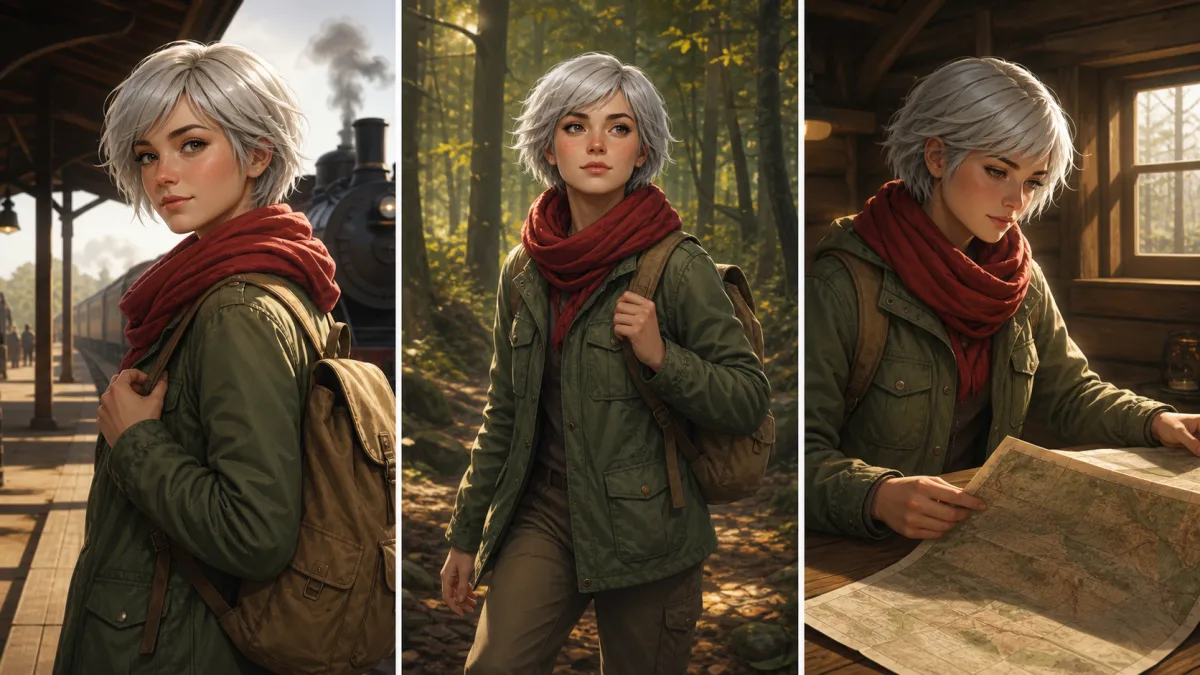
To keep character consistent across AI images, create a visual source of truth before generating a series. Define stable identity anchors—face shape, feature proportions, hair, age, body build, distinctive marks, and core wardrobe—then use the same approved reference and identity block for every scene. Separate those fixed traits from variables such as pose, expression, environment, lens, and action. Change one scene dimension at a time, preserve camera information that matters, and return to the original reference when drift accumulates. Review each image against a character sheet at full size. Consistency does not mean identical poses or lighting; it means the character remains recognizable while the story changes around them.
Build a character sheet before a scene library
Choose one approved portrait and, when possible, a small set of complementary views that clearly show the same design. A useful sheet may include front, three-quarter, and profile views plus a full-body image. Keep lighting neutral enough to reveal shapes and colors.
Record observable attributes:
- Approximate age range and body build
- Face shape, eye spacing, nose, mouth, and jaw
- Hairline, cut, color, texture, and parting
- Skin tone and distinctive marks
- Core clothing silhouette and recurring accessories
- Height relationships if other characters appear
- Features that may change, such as expression or outerwear
Do not overload the sheet with dramatic effects. Its job is identity documentation, not storytelling.
Divide anchors from scene variables
Create two sections in every brief. Identity anchors stay stable. Scene variables can change. For example, a red scarf might be a signature anchor while the coat changes by season. If every garment changes, preserve facial structure, hair, build, and one recognizable accessory.
This division also prevents prompts from becoming contradictory. “Same character” and “different hairstyle, age, body type, and wardrobe” cannot both have priority. Decide what continuity means for the project before generating the next frame.
Use a reusable identity block
Keep the wording and order of stable traits consistent. Add scene direction after the identity block instead of rewriting the character every time.
Use the approved character reference as the identity source. Preserve the same
oval face, wide-set dark eyes, straight nose, narrow jaw, short wavy black hair
with a left part, small eyebrow scar, medium build, and red woven scarf. Keep
the character’s age and body proportions unchanged. New scene: the character
waits at a quiet train platform at dawn, three-quarter full-body view, calm
expression, charcoal coat, soft mist. Do not redesign the face, hair, scarf,
or proportions.
Describe only visible traits. A character’s personality can guide acting, but it cannot replace concrete visual anchors.
Control pose and camera changes separately
Large changes in pose and camera angle reveal information that a single reference may not contain. Move gradually when continuity is critical: front to three-quarter before extreme profile, standing to walking before a complex action. Preserve body proportions and name which features should remain visible.
If a radically different viewpoint is necessary, use an additional approved view or create an intermediate image. Do not assume a front portrait contains an exact design for the back of a jacket or hairstyle.
Manage wardrobe without losing recognition
Wardrobe can communicate time and place, but it also carries a large share of visual identity. Keep one or two signature elements, a stable palette, or a recurring silhouette. Specify whether an accessory is always present or scene-dependent.
When changing clothes, preserve face, hair, body shape, pose, and signature features explicitly. Review how collars, hats, glasses, or scarves interact with the face. A new hat that changes the hairline may make the character feel different even when the eyes remain similar.
Why characters drift across a sequence
Drift accumulates when each new output becomes the only reference for the next. Small changes in eye spacing, jaw, hair, and height compound over several steps. It also happens when prompts prioritize genre and mood over identity, or when the character becomes too small in a complex scene.
Return regularly to the original approved reference and identity block. Reduce scene complexity, bring the character closer, and make one variable change. If only a hand, accessory, or garment drifts, repair that area if local editing is available instead of regenerating the complete character.
Review continuity with a fixed comparison grid
Place the source and new image side by side at comparable face and body sizes. Check feature spacing, hair silhouette, age, height, shoulder width, recurring colors, and signature marks. Then judge whether scene lighting plausibly changes appearance without changing identity.
Review the sequence as a whole. A character may match each neighboring frame yet gradually drift away from the first. The original sheet remains the authority, not the most recent output.
Character-consistency checklist
Before adding an image to the series, confirm:
- The approved reference remains the identity source.
- Stable anchors are written consistently.
- Scene variables are clearly separated.
- Face, hair, age, build, and proportions match.
- Signature wardrobe or marks remain accurate.
- Pose and camera changes reveal only plausible new information.
- Hands, accessories, and clothing contacts are correct.
- The result matches both the previous frame and original sheet.
Build the next scene without redesigning the cast
Study character and portrait sequences in the AI image showcases, then use the AI image generator to prepare one reusable identity block. Open the Create workspace with the approved character reference and one new scene variable. A consistent AI character workflow grows from documented anchors and disciplined review, not from repeatedly asking for “the same person” after the design has already drifted.
Related guides
Browse all ai reference editing guidesAn AI Inpainting Mask Guide for Clean Local Edits
Plan cleaner local AI edits by choosing mask boundaries, context margins, feathering, protected regions, staged passes, and full-resolution checks.
How to Write Better Negative Prompts for Realistic AI Images
Build concise negative prompts from visible risks while keeping positive direction clear, specific, compatible, and useful for realistic image creation.
How to Fix Unrealistic Reflections in AI Images
Correct mirrors, glass, water, metal, and glossy surfaces by tracing reflected geometry, viewpoint, light, roughness, occlusion, and material behavior.
Last updated .