
How to Keep a Consistent Art Style Across AI Images
Define a repeatable visual system for an image series using stable palette, shape language, line, texture, lighting, composition, and reference rules.
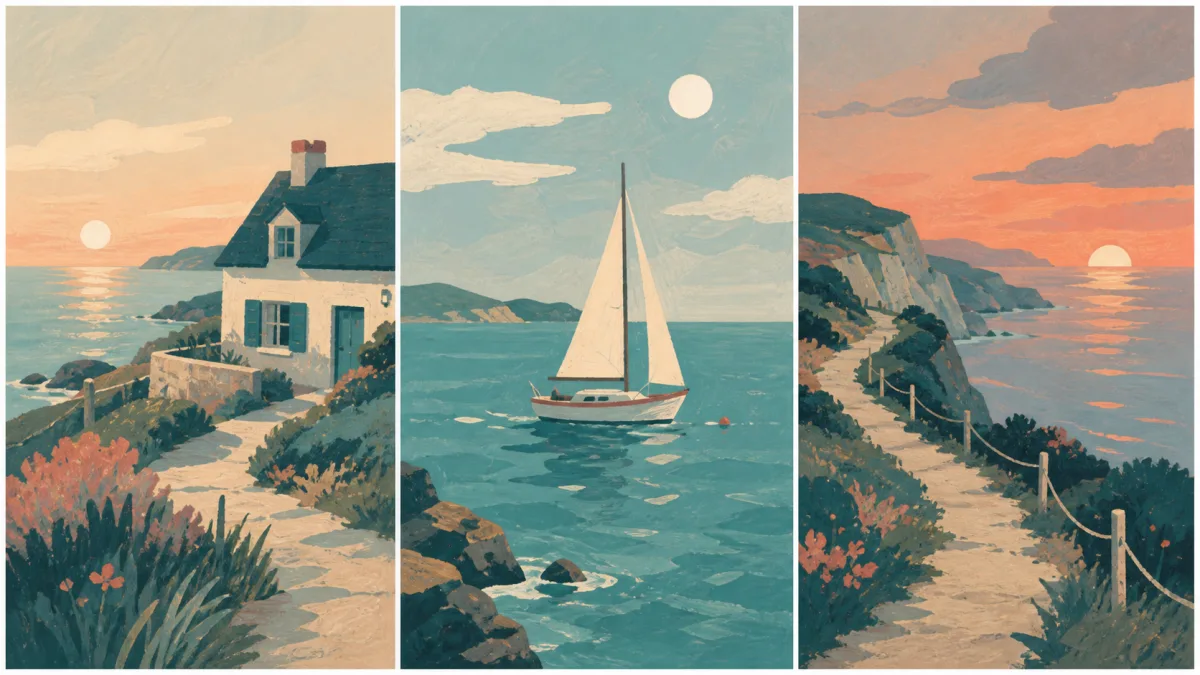
To keep consistent art style across AI images, define the style as a repeatable visual system rather than a single artist name or vague mood. Document palette, value range, shape language, line quality, texture, lighting, perspective, composition, and finishing rules. Use one or two approved images as references, keep the style block stable, and place changing subjects or scenes in a separate part of the prompt. Limit each generation to a small number of new decisions, then compare it with the entire series. Preserve structural style characteristics before decorative effects. A coherent series can contain different subjects and layouts; consistency comes from shared visual rules, not identical images.
Turn “style” into observable decisions
Words such as “cinematic,” “modern,” or “whimsical” are too broad to control a series. Describe what those words mean in the images. A style can be documented through visible choices that another creator could follow.
Build a style sheet covering:
- Limited or broad color palette
- Light, midtone, and shadow relationship
- Geometric, organic, or exaggerated shape language
- Clean, broken, heavy, or absent outlines
- Smooth, painterly, paper, ink, or digital texture
- Flat, dimensional, soft, or dramatic lighting
- Preferred camera height and depth
- Typical amount of negative space and visual density
Include what the style avoids, but keep exclusions specific rather than building an endless negative prompt.
Choose representative references
One reference may communicate palette well but say little about characters or environments. Select a small reference set with clearly assigned roles: one for color and texture, another for composition or shape language. Avoid mixing admired images that use incompatible perspective, lighting, and rendering methods.
When using a reference, state what it supplies. “Use reference one for muted blue-orange palette and dry paper texture; use reference two only for wide asymmetrical composition.” Do not ask the model to copy protected work or imitate a living artist’s signature. Describe general visual properties and build an original system.
Keep a stable style block
Use the same core style language in each prompt. Place new content after it so the model can distinguish the series rules from the scene.
Maintain the approved series style: simplified organic shapes, restrained navy,
rust, cream, and sage palette, matte gouache-like fills, sparse charcoal edge
marks, soft directional light, shallow atmospheric depth, and generous negative
space. Keep contrast concentrated around the focal subject and avoid glossy 3D
materials, neon colors, photoreal texture, and dense background detail. New
scene: a cyclist crossing a quiet bridge in early morning mist.
If the new subject requires an exception, document it. Unexplained exceptions become accidental drift in later images.
Separate content variation from visual treatment
Change the subject, action, or environment while holding palette, texture, light, and shape language stable. Do not change location, time of day, rendering method, lens, and color scheme in the same first attempt. A controlled series reveals which variable caused the style to move.
For campaigns, define which elements can flex by channel. A social crop may be square and a hero image wide, but both can share the same horizon height, color balance, and texture. Style consistency should survive format adaptation rather than forcing every image into one ratio.
Preserve value structure and palette relationships
Exact colors can shift under different scenes, but their relationships should remain recognizable. Decide which hue is dominant, which is supporting, and which is reserved for accents. Define whether shadows stay neutral or colored and how bright highlights may become.
Check images in grayscale. If one frame uses gentle value separation and another has extreme black-white contrast, the series may feel inconsistent even when the hues match. Preserve the hierarchy, not just a list of color names.
Use recurring composition rules
A series feels connected when it repeats a few layout behaviors: low horizon, centered subject, strong diagonal, quiet upper third, or consistent camera height. These are not rigid templates. They are a visual grammar that helps different scenes belong together.
Choose two or three recurring rules and allow one controlled variation per image. This creates rhythm without duplication. Keep text-safe areas or product placement consistent when the series supports marketing layouts.
Why a series drifts after several images
Style drift often begins when the latest output replaces the original style reference. Small changes in saturation, texture, line weight, and depth accumulate. It also occurs when scene-specific language—“glossy nightclub,” for example—conflicts with a matte, restrained system.
Return to the approved references and stable style block for every major generation. Remove conflicting adjectives and simplify the scene. If only color or texture drifts, correct that property while preserving composition and subject. A full redraw can unnecessarily disturb the content that already works.
Series-consistency checklist
Review each candidate for:
- Palette roles and value range
- Shape language and proportions
- Line weight and edge treatment
- Texture type and scale
- Light direction, softness, and contrast
- Perspective and depth behavior
- Composition rules and negative space
- Finishing such as grain or sharpening
- Fit with both the first reference and the full series
Create a contact sheet. Inconsistency becomes easier to see when all images appear together at the same size.
Add one image to a coherent visual system
Browse varied styles in the AI image showcases and identify the specific properties you want to repeat. Use the AI image generator to write a stable style block, then open the Create workspace with the approved references and one new scene. A consistent visual style AI image series comes from a documented system that can guide many subjects without collapsing them into copies.
Related guides
Browse all ai reference editing guidesAn AI Inpainting Mask Guide for Clean Local Edits
Plan cleaner local AI edits by choosing mask boundaries, context margins, feathering, protected regions, staged passes, and full-resolution checks.
How to Write Better Negative Prompts for Realistic AI Images
Build concise negative prompts from visible risks while keeping positive direction clear, specific, compatible, and useful for realistic image creation.
How to Fix Unrealistic Reflections in AI Images
Correct mirrors, glass, water, metal, and glossy surfaces by tracing reflected geometry, viewpoint, light, roughness, occlusion, and material behavior.
Last updated .