
How to Fix Plastic Skin in AI-Generated Portraits
Restore believable portrait skin by correcting texture scale, highlights, color variation, facial structure, retouching language, and local detail.
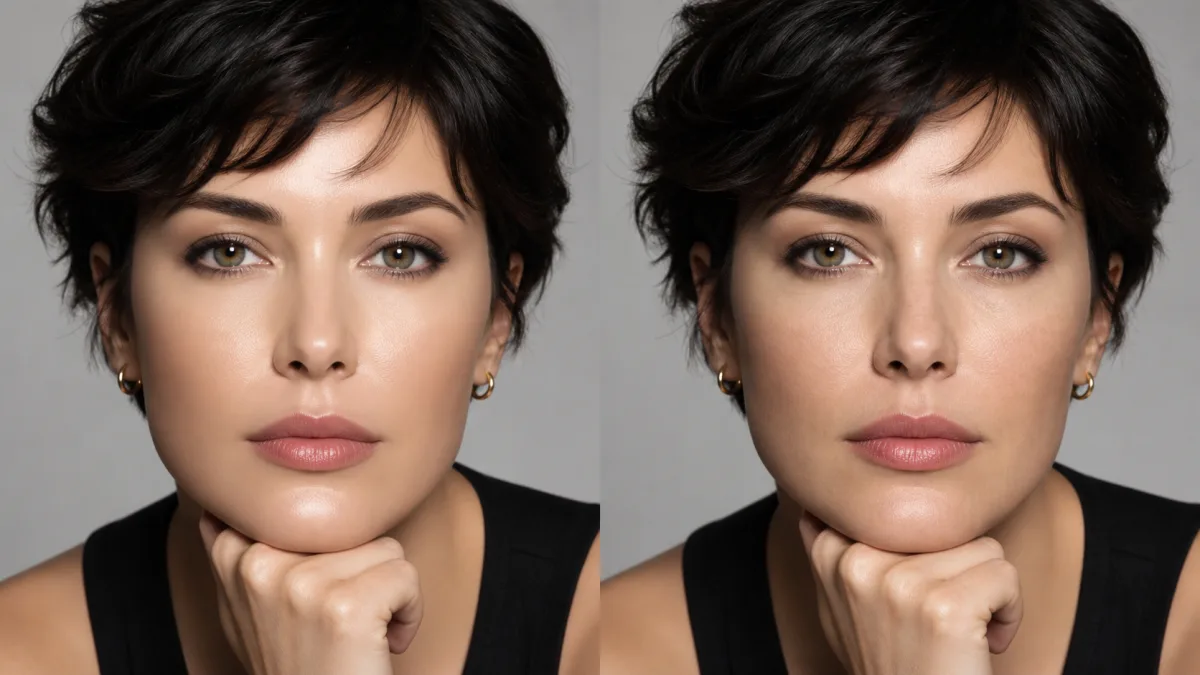
To fix plastic skin in AI images, preserve the person’s identity and facial geometry while correcting surface response rather than regenerating the whole portrait. Plastic-looking skin usually combines overly smooth texture, broad glossy highlights, uniform color, excessive sharpening around features, and beauty language that removes natural variation. Ask for restrained pores at an appropriate scale, soft tonal transitions, subtle color differences, realistic highlight falloff, and unchanged eyes, nose, mouth, jaw, expression, and lighting direction. If local editing is available, limit the revision to exposed skin while protecting hair, lashes, teeth, jewelry, and clothing. Review the portrait at both normal viewing size and full resolution so texture supports the face instead of becoming a visible effect.
Diagnose texture, light, and color separately
“Plastic skin” is a visual impression produced by several causes. Zoom out and identify whether the face looks like smooth vinyl, wax, heavy makeup, or oversharpened CGI. Then inspect the source at full size.
Look for:
- No visible texture across cheeks, forehead, and nose
- One broad white highlight with no gradual falloff
- Uniform peach or beige color across the entire face
- Dark, sharp outlines around lips, nostrils, or eyes
- Identical detail in both lit and shadowed areas
- Smoothed skin combined with unnaturally crisp hair and lashes
Correct the dominant problem first. Adding pores cannot repair impossible lighting, and reducing highlights will not fix altered facial proportions.
Protect identity before touching the surface
Skin editing happens across the features that define a person. State that facial structure, age, expression, eye shape, nose, mouth, jawline, hairline, and skin tone remain fixed. Do not ask for a “more attractive” or “younger” face. Those directions invite geometry changes rather than material corrections.
When working from a real person’s photo, keep recognizable traits such as freckles, moles, fine lines, and under-eye structure unless there is a legitimate request to remove a temporary blemish. Natural texture does not mean exaggerating every pore, and respectful retouching does not require erasing age.
Describe skin as a living material
Use a short prompt that addresses texture scale, color, and highlight behavior while protecting the portrait.
Preserve the exact person, facial proportions, expression, age, skin tone,
hairline, camera angle, and light direction. Correct only the artificial plastic
skin appearance. Restore subtle natural pore texture at realistic scale, gentle
color variation across cheeks and forehead, soft highlight falloff, and normal
detail reduction in shadow. Keep freckles and natural facial lines. Do not
reshape, beautify, smooth, sharpen, relight, or change any facial feature.
Avoid contradictory terms such as “flawless natural pores” or “perfectly smooth realistic skin.” Decide whether the goal is polished retouching or documentary texture, then describe that level clearly.
Match texture to distance and resolution
A close beauty portrait can show subtle pores and fine hairs. A waist-up photograph should show less. If pore detail is equally visible at every scale, the face may resemble sandpaper. Judge texture at the final output size, not only while zoomed to 300 percent.
Preserve a hierarchy: more definition around the focal plane, softer detail toward the ears and neck, and less visible texture in shadow. Texture should follow facial form instead of being stamped uniformly across eyes, lips, and hair.
Correct highlight shape before adding detail
Skin is neither perfectly matte nor mirror-like. Forehead, nose, cheeks, and lips can reflect light differently, but highlights should respond to the source size and angle. A large softbox creates broad transitions; a small hard source creates more defined highlights and shadows.
Ask for a natural transition from highlight to midtone. Do not scatter random bright spots to suggest moisture. If the existing light is the source of the synthetic look, refine its falloff while preserving its direction. A full lighting redesign risks changing the face and background.
Retain believable color variation
Real skin contains subtle variation from circulation, thickness, makeup, and reflected environment. Cheeks, nose, lips, forehead, and neck are not one flat swatch. At the same time, strong blotches or unrelated colors look unhealthy or stylized.
Request restrained variation consistent with the person’s existing skin tone. Check that face, ears, neck, and hands belong under the same light. Correct a mismatched neck locally if possible rather than applying a global color wash that changes clothing and background.
Why realism prompts create harsh pores or older faces
Broad requests for “ultra-real skin” often overcompensate. They may add deep wrinkles, high-contrast pores, stubble, redness, or gritty sharpening. The model is solving realism by increasing visible texture rather than matching the person and viewing distance.
Fix this by specifying subtle texture, unchanged age, and realistic scale. Remove words such as “rugged,” “weathered,” or “hyper-detailed” unless they describe the subject. If one cheek is overprocessed, use a local correction if available instead of smoothing the complete face again.
Portrait-skin checklist
Before accepting the edit, verify:
- Facial geometry, expression, and age match the source.
- Pores and fine texture are subtle at final viewing size.
- Highlights have gradual, physically plausible falloff.
- Skin color varies gently without blotches or a flat wash.
- Freckles, moles, and natural lines remain where intended.
- Eyes, lips, teeth, hair, and jewelry were not regenerated.
- Face, neck, ears, and hands share believable light and color.
- Sharpening and noise do not create a gritty surface.
Refine the portrait without replacing the person
Review portrait treatment in the AI image showcases, then use the AI image generator to write a surface-specific preserve/change instruction. Open the Create workspace with the highest-quality source and correct the skin response while keeping the identity fixed. Natural skin texture AI portrait work succeeds when viewers notice the person first and the retouching never becomes the subject.
Related guides
Browse all ai reference editing guidesAn AI Inpainting Mask Guide for Clean Local Edits
Plan cleaner local AI edits by choosing mask boundaries, context margins, feathering, protected regions, staged passes, and full-resolution checks.
How to Write Better Negative Prompts for Realistic AI Images
Build concise negative prompts from visible risks while keeping positive direction clear, specific, compatible, and useful for realistic image creation.
How to Fix Unrealistic Reflections in AI Images
Correct mirrors, glass, water, metal, and glossy surfaces by tracing reflected geometry, viewpoint, light, roughness, occlusion, and material behavior.
Last updated .