
How to Change Clothes With AI Without Changing the Face
Replace an outfit with AI while preserving identity, pose, body proportions, hair, hands, lighting, and the natural relationship between fabric and body.
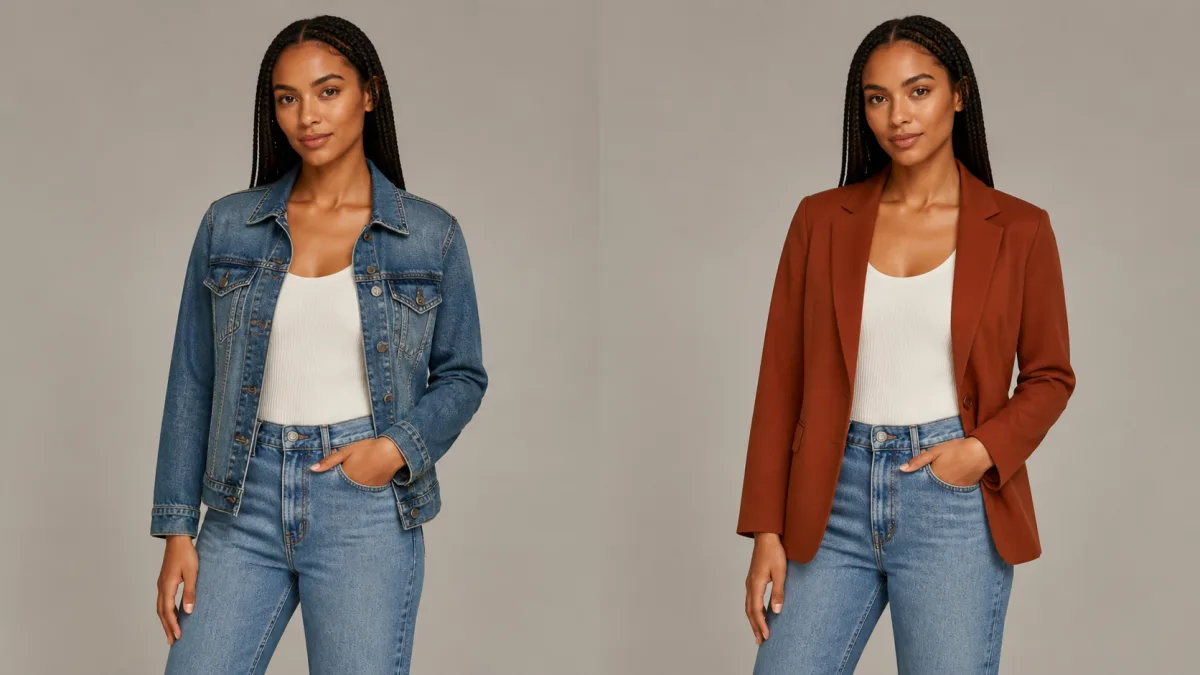
To change clothes with AI without changing face identity, isolate the wardrobe decision from the rest of the portrait. Preserve the face, hair, expression, head angle, pose, body proportions, hands, background, and camera perspective. Then describe the replacement garment in concrete terms: category, cut, length, fabric, color, fit, neckline, sleeves, and closures. Keep the new outfit compatible with the existing posture and lighting. If local selection is available, edit the clothing region with a small amount of shoulder and waist context while protecting the head and hands. Review seams, fingers, jewelry, and fabric contact at full resolution before accepting the result.
Start with a wardrobe-compatible source
The best source clearly shows the current garment boundary and enough of the body to understand the pose. Crossed arms, hair covering the shoulders, hands in pockets, coats hiding the torso, and cropped elbows all create ambiguous contact points. The model may redraw those areas while trying to invent the new fabric.
Choose an image with a stable camera angle, readable shoulders and waist, and lighting that reveals the garment shape. If the final outfit needs full-length trousers or a dress, begin with a full-body reference. A head-and-shoulders portrait does not contain reliable information about the legs or stance.
Write down what the outfit must not change
Wardrobe touches several identity-adjacent regions, so the preserve list must extend beyond the face. Record the protected elements before describing the new garment.
Preserve:
- Face, expression, skin tone, hair, and head angle
- Shoulder width, torso length, pose, and body proportions
- Hand shape, finger position, and visible jewelry
- Existing camera position, crop, background, and light direction
- Any object the person is holding
Change only the garments named in the prompt. If shoes, accessories, or jewelry should stay, say so explicitly rather than assuming they are outside the wardrobe request.
Describe clothing as construction, not a mood
“Make the outfit elegant” leaves too many decisions open. Describe a garment a stylist or pattern maker could identify. State the item, cut, material, color, sleeve, neckline, hem, and fit. Include one or two styling details only when they matter.
Preserve the person’s exact face, expression, hair, head angle, pose, body
proportions, hands, jewelry, background, and camera perspective. Replace only
the current top with a tailored navy wool blazer over a plain ivory crew-neck
shirt. The blazer has a single-breasted cut, two matte buttons, natural shoulder
structure, and realistic folds at the bent elbows. Keep the same lighting and
do not alter the person’s identity or posture.
Avoid combining several competing fashion references. One coherent garment description is easier to preserve than a collage of trends.
Respect pose, gravity, and fabric contact
Clothes must respond to the existing body. A seated pose compresses fabric at the waist and hips. A raised arm changes the shoulder seam and creates folds near the armpit. A hand resting on a jacket should sit in front of the fabric, not merge into it. Mention the pose only to preserve it, then ask for realistic drape and folds consistent with that position.
Choose materials that can plausibly produce the requested silhouette. Heavy denim, fine silk, ribbed knit, and structured wool behave differently. If the prompt asks for a rigid shape on a twisting body, the model may solve the conflict by changing posture.
Use local editing boundaries if available
When the editor supports a selection or mask, include the current garment plus a narrow area around its edges. Leave the face, hair, hands, and background protected. Include enough neck, shoulder, and waist context for seams to connect naturally, but do not expose the entire body to unnecessary regeneration.
For hair that overlaps clothing, decide which should remain on top. Protect the hair itself while allowing a small transition around loose strands. For hands crossing the garment, keep the hands protected and edit underneath them if the tool permits layered local work.
Why AI outfit edits change the face or body
The face often drifts because the prompt asks for a complete new look rather than a garment replacement. Terms such as “fashion makeover,” “glamorous model,” or “red-carpet transformation” invite changes to makeup, hair, body shape, and expression. Body proportions can change when the requested clothing cut conflicts with the source pose or when the original garment hides the underlying anatomy.
Fix the edit by removing makeover language, restoring the preserve list, and choosing a garment that fits the visible pose. If the face changed, return to the original image rather than editing the drifted result. If one sleeve or hand contact failed, correct only that area if local editing is available.
Inspect tailoring details and identity together
First compare the face and pose with the source. Then inspect collar symmetry, lapels, buttons, pockets, sleeve length, hem, and seams. Check whether patterns continue across folds and whether fabric passes correctly behind arms, hair, bags, and jewelry. Look closely at fingers near cuffs and pockets, where extra fabric can create distorted anatomy.
Zoom out to judge whether the outfit belongs in the original light. Bright white fabric should reflect nearby color; dark fabric should retain enough fold detail to avoid becoming a flat shape.
Outfit-editing checklist
Confirm all of the following:
- The face, hair, expression, and age remain unchanged.
- The original pose and body proportions are preserved.
- Hands and held objects remain anatomically correct.
- The garment description is specific and coherent.
- Fabric folds respond to gravity and the pose.
- Necklines, cuffs, hems, buttons, and seams connect cleanly.
- Lighting and contact shadows match the source.
- No unintended accessory or background change appeared.
Make a focused wardrobe variation
Use the AI image showcases to study believable portrait styling and fabric detail. Open the AI image generator to prepare a preserve-first outfit instruction, then continue in the Create workspace with one source and one garment change. The strongest AI outfit changer preserve face workflow is the one that treats clothing as a local construction problem while leaving the person unmistakably the same.
Related guides
Browse all ai reference editing guidesAn AI Inpainting Mask Guide for Clean Local Edits
Plan cleaner local AI edits by choosing mask boundaries, context margins, feathering, protected regions, staged passes, and full-resolution checks.
How to Write Better Negative Prompts for Realistic AI Images
Build concise negative prompts from visible risks while keeping positive direction clear, specific, compatible, and useful for realistic image creation.
How to Fix Unrealistic Reflections in AI Images
Correct mirrors, glass, water, metal, and glossy surfaces by tracing reflected geometry, viewpoint, light, roughness, occlusion, and material behavior.
Last updated .