
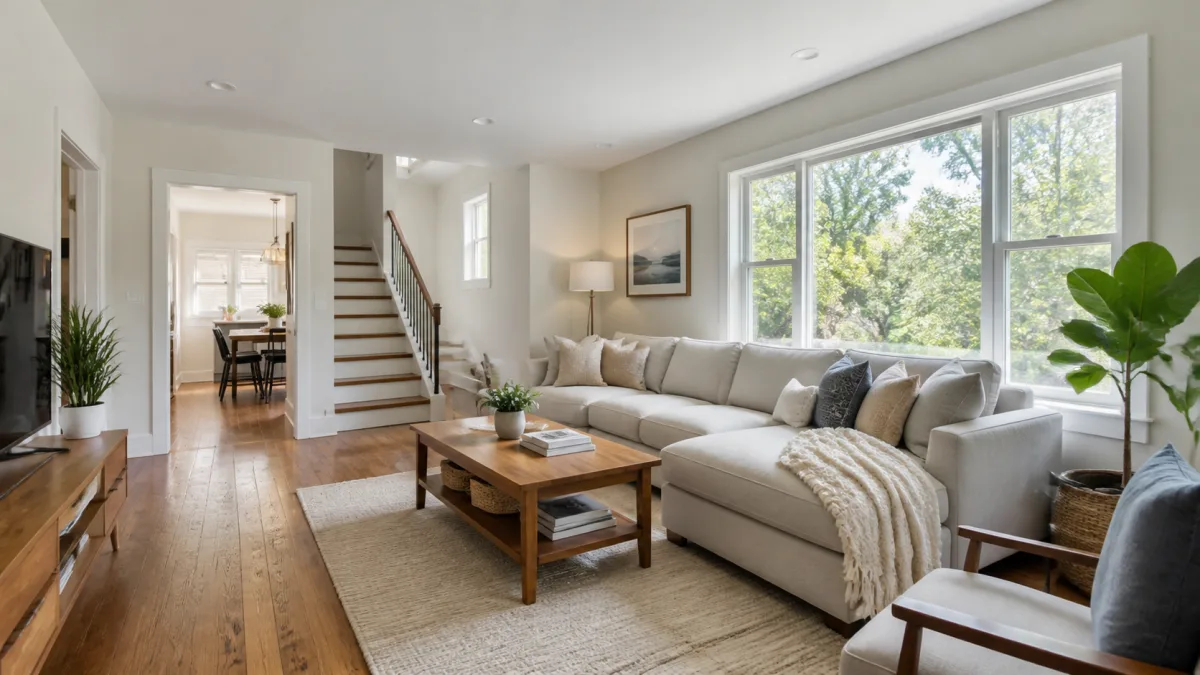
Responsible AI real estate listing hero image prompts improve presentation without changing what a buyer or renter would encounter. Begin with a current reference photograph and preserve room dimensions, architecture, permanent fixtures, window placement, view, materials, and condition. Limit edits to truthful corrections such as exposure balance, color neutrality, privacy-safe removal of personal items where allowed, or restrained virtual staging that is clearly disclosed. Property listing image prompts should never invent space, repair defects, replace finishes, or create a better exterior view. Accuracy, local advertising rules, and platform policies take priority over visual polish.
Define what may and may not change
Create an edit brief before opening the tool. Separate fixed property facts from removable objects and presentation adjustments. Fixed facts include walls, ceilings, floors, doors, windows, built-ins, appliances included in the listing, visible wear, and the actual outdoor view. These should remain unchanged.
Potentially editable elements include white balance, mild lens correction, exposure, and personal clutter, subject to local rules and the listing platform's policy. Virtual furniture may be acceptable in some contexts only when labeled clearly. Verify current legal, brokerage, and marketplace requirements before publishing.
Select a reference image that explains the space
Use a sharp photograph taken from a stable height with vertical lines as straight as practical. Pick a viewpoint that shows the room's circulation and defining feature without exaggerating width. Extreme wide-angle distortion can make a room appear larger and complicates trustworthy editing.
The hero should represent the listing, not conceal it. For an exterior, show the actual approach and facade. For an interior, choose the main living area or another space that genuinely differentiates the property. Avoid blending multiple photographs into an impossible room.
Preserve geometry and permanent details
State the protected elements near the beginning of the prompt. Name wall openings, window count, ceiling features, flooring pattern, built-in cabinetry, fireplace, visible hardware, and any view through glass. Ask the model to retain camera position, perspective, and room proportions.
Do not request structural straightening that removes real irregularities or changes floor area. Correcting a slight camera tilt is different from moving walls. Compare the result over the source at high opacity if your editing workflow supports it; misaligned corners and resized windows are warning signs.
Control light without inventing a different day
Balance exposure so interior detail and window areas remain readable, but preserve the direction and general conditions in the source. If sunlight enters from the left, shadows should agree. Avoid replacing an overcast view with a dramatic sunset or adding light that implies windows outside the real room.
Request neutral whites and material-accurate color. Overly warm interiors can change paint, wood, and flooring appearance. Keep some natural shadow depth; a uniformly bright room can look flat and conceal the actual form.
Copy-ready interior hero prompt
Use the uploaded current photograph as the exact factual reference for this
property listing. Preserve the room dimensions, camera position, perspective,
wall and ceiling geometry, number and placement of doors and windows, flooring,
built-in cabinetry, fireplace, permanent fixtures, material colors, visible
condition, and real view outside. Create a clean wide listing hero by correcting
only mild exposure imbalance, neutral white balance, and slight camera tilt.
Remove only [specific personal movable items], leaving all property features
unchanged. Use natural-looking light consistent with the source and realistic
shadows. No new windows, enlarged room, replaced surfaces, repaired damage,
invented view, altered appliance, virtual furniture, text, logo, or watermark.
If virtual staging is permitted and disclosed, make it a separate version:
Using the unchanged room reference and protected architectural details, add
only [specific furniture pieces] at realistic scale with clear walkways and
physically plausible contact shadows. Do not hide outlets, vents, stains,
damage, windows, doors, or permanent features. Do not alter the room, view,
light direction, finishes, or included fixtures. Produce a separate virtually
staged image for explicit labeling; no text or watermark inside the image.
Use the AI image generator for controlled variations, not for creating a nonexistent property.
Fix common listing-image failures
If the room grows wider, the prompt did not protect geometry strongly enough or the source already has extreme lens distortion. Return to the original viewpoint, lock window and wall positions, and reduce the requested changes. If flooring or cabinet color shifts, request neutral white balance and name the exact material to preserve.
Floating furniture, blocked doors, and mismatched shadows make virtual staging unreliable. Reduce the furniture count, specify scale and clear circulation, and reject any result that hides a property feature. If a view changes through a window, restore the original pixels rather than trying to describe the scenery from memory.
Review accuracy side by side
Compare source and result at full size. Check corners, openings, ceiling height, floor seams, reflections, fixtures, outlet placement, outside view, and every visible condition issue. A polished image is not acceptable if it changes a fact a visitor would reasonably use to judge the property.
Keep the original photograph and an edit record. Label materially altered or virtually staged images as required. Do not use an AI image as evidence of a renovation, view, amenity, or included item that does not exist.
Browse Showcases for composition ideas, but evaluate every listing edit against its own real reference.
Delivery checklist for a listing hero
- The result matches the current property and source viewpoint.
- Architecture, scale, materials, condition, and exterior view are unchanged.
- Light and color corrections remain plausible.
- Removed objects were movable and permitted to be removed.
- Virtual staging, if used, is separate and clearly disclosed.
- No generated furniture blocks a real feature or circulation path.
- Current local rules, brokerage policy, and platform requirements were checked.
- The original, edited file, and edit notes are retained.
- Export dimensions and crop were previewed on the listing page.
Start with the strongest truthful source photograph and make the smallest useful edit in Create. A credible hero helps viewers understand the property; it should never make the listing more appealing by changing the property itself.