
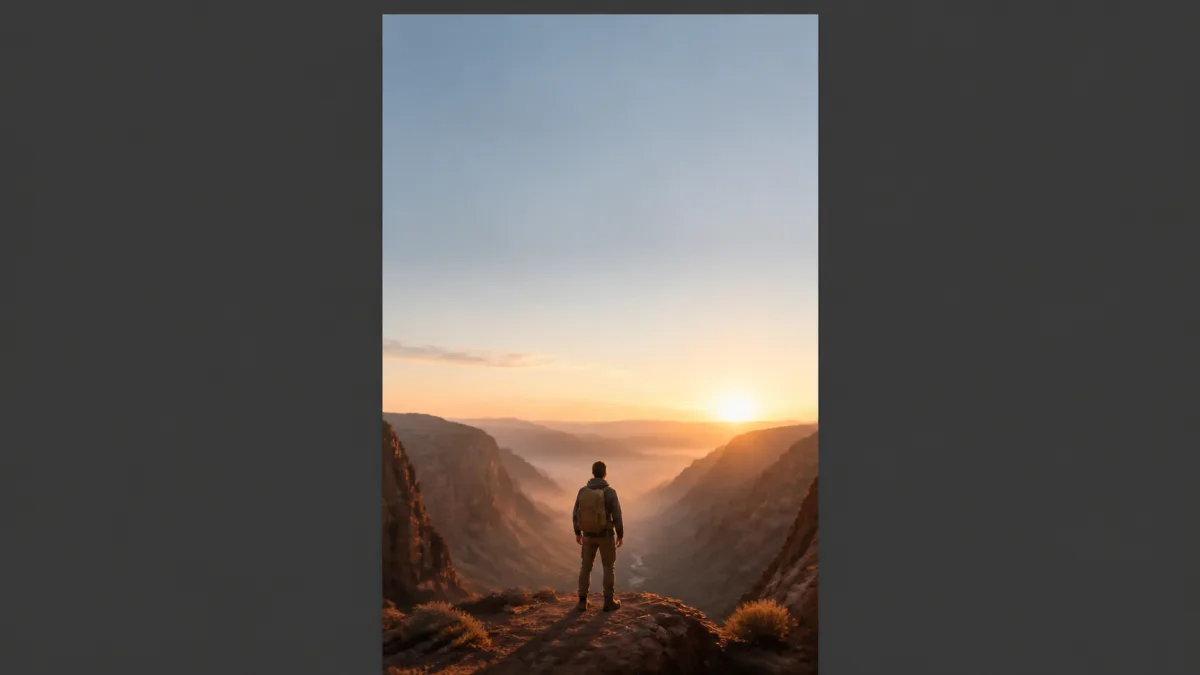
The most useful 9:16 AI image prompt examples describe how the eye travels through a tall frame. Place one main subject in a deliberate vertical zone, add foreground and background depth, and reserve quiet space where a mobile interface may cover the image. Strong vertical AI image prompts also keep faces, products, and meaningful actions away from vulnerable top and bottom edges. Generate the image without text or buttons, because those elements should be added and checked in the publishing layout. This guide focuses specifically on vertical staging and safe zones rather than general aspect-ratio selection.
Build a vertical path instead of stacking objects
A tall frame needs visual movement from bottom to top. Use a foreground cue, main focal subject, and distant element to create depth. A path can begin near the lower edge, lead toward a traveler in the middle, and finish at a mountain or sky detail above. In an interior, a table edge can anchor the bottom while a standing subject and high window carry the gaze upward.
Do not fill every level with an equally important object. Choose one focal point, one directional support, and a calm region. Repeating faces or products in three stacked rows usually feels like a collage rather than a coherent scene.
Place the subject by intended viewing behavior
Lower-center placement can create room for environment or a headline above. A subject on the lower left can look or move toward open space on the right. A centered full-body figure can work when symmetry is part of the idea, but keep enough margin above the head and below the feet.
Describe relative scale as well as location. "Person in the lower middle third, occupying about half the frame height" gives more direction than "vertical portrait." For a close face, state whether shoulders should remain visible and whether the eyes sit above or below the frame midpoint.
Reserve safe zones for overlays
Mobile platforms often place account information, captions, controls, or calls to action over the top, bottom, or sides. Those interfaces and recommendations can change. Check the current safe-area guidance in the exact publishing tool before export.
In the prompt, keep irreplaceable content inside a central region and make the outer areas visually forgiving. Safe does not mean empty white strips. Use sky, a softly blurred wall, floor, water, or low-detail atmosphere. Do not place a face, product label, small hand action, or story clue against an extreme edge.
Example: cinematic person in a landscape
Create a 9:16 vertical cinematic image of one hiker pausing on a narrow ridge
at early morning. Place the hiker in the lower-middle third, occupying about
one third of the frame height, facing toward the open valley. Use a subtle rock
edge in the foreground, the hiker as the clear focal point, layered mountains
in the middle distance, and calm misty sky above. Reserve low-detail sky in the
upper quarter and simple shadowed ground near the bottom for possible mobile
overlays. Keep the complete figure and backpack inside the central safe region.
Soft side light from the left, restrained slate and warm amber palette. No
text, logos, extra people, cropped feet, floating gear, watermark, or UI.
Example: vertical product scene
Create a 9:16 vertical lifestyle composition featuring one [product] on a
[surface] in [relevant setting]. Preserve the product's real shape, color,
material, label placement, and scale from the reference. Position it in the
lower center, large enough to identify on a phone, with one vertical background
line leading upward and a calm softly lit wall in the upper third. Keep the
complete product, label, and contact shadow inside the central safe region.
Use one broad key light from [direction], gentle fill, and only [one relevant
prop]. No invented label text, duplicates, hands, headline, logo, interface,
edge clutter, or watermark.
Example: overhead process scene
Create a 9:16 true-overhead image of [simple craft, recipe, or desk process].
Arrange the main work area along a clear bottom-to-top diagonal, with [primary
object] near the center and only [two supporting tools] spaced around it. Leave
a clean low-detail surface in the top quarter and keep the active hands and
essential materials away from all outer edges. Use soft window light from the
left, natural compact shadows, and a limited [palette] color scheme. The action
must be physically plausible and immediately readable at mobile size. No text,
fake writing, duplicate tools, extra fingers, spilled materials, UI, or
watermark.
Compare candidate vertical frames in Showcases, then adapt one example in the AI image generator.
Fix common 9:16 composition failures
If the result feels like a wide image cropped narrowly, the prompt probably lacks a vertical path. Add foreground, middle, and upper depth cues, then specify subject scale. If the subject becomes tiny, remove distant scenery and request a closer placement rather than cropping afterward.
When the top feels empty, add gentle structure such as a window glow, cloud gradient, hanging light, or receding architecture without creating a second focal point. If interface controls cover the subject, move essential details inward and regenerate; stretching the canvas rarely repairs a composition built for the wrong safe area.
Prepare the final vertical asset
Preview the image inside the actual mobile layout, not only in an image viewer. Add text and branding separately, then check them on a small screen. Confirm current platform dimensions, compression behavior, file-size limits, and overlay guidance immediately before publishing because these requirements may change.
Create alternate text placements from the same clean master, but preserve an untouched version. If several platforms use different overlays, export a dedicated layout for each instead of assuming one safe zone fits all.
Vertical delivery checklist
- The file is truly composed for 9:16 rather than aggressively cropped.
- One focal subject remains readable on a phone.
- Foreground, middle, and upper zones create a clear visual path.
- Faces, labels, hands, and key actions stay inside the verified safe area.
- Top and bottom overlay regions contain only expendable detail.
- Added text is accurate, legible, and separate from the generated image.
- Current platform dimensions and interface guidance have been checked.
- The exported file has been previewed in its real placement.
Choose one scenario, paste the adapted prompt into Create, and review it with the real overlay visible. A successful 9:16 image is designed around the vertical experience from the first prompt, not rescued by a final crop.